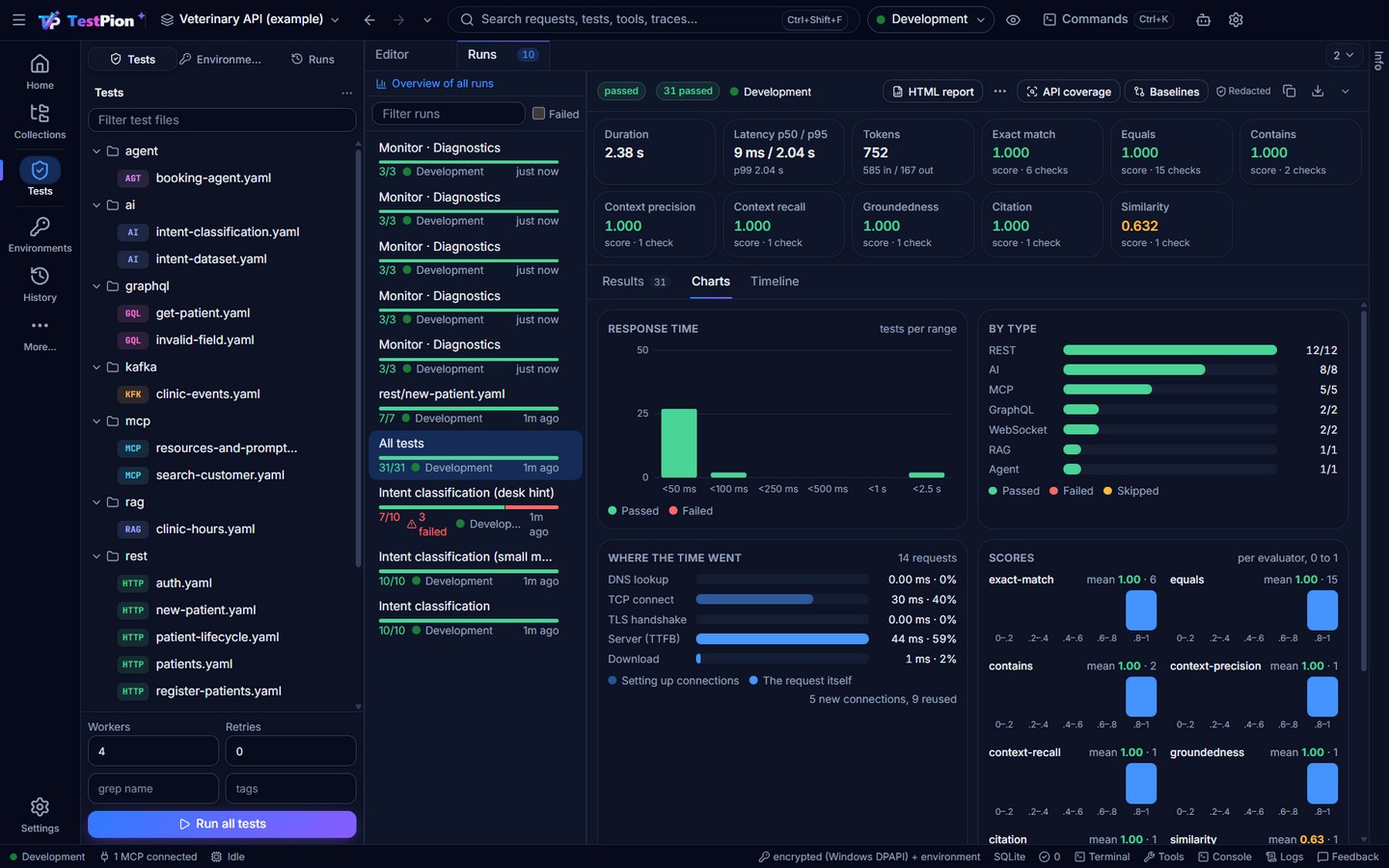
Test runner
Tests are YAML or JSON files under tests/, of type http, graphql, grpc, websocket (or socketio, mqtt), mcp, llm, rag or agent, and the flow blocks: delay (a pause between the steps of a flow), condition (an if: with true and false branches), script (tp.* code, no request), flow (another test file run as one step), log (a message in the results), wait (a request polled until a condition holds), set (values into a variable scope) and assert (checks only). A file can hold one test, a tests: list (with defaults:), or a dataset template. You don't have to write them by hand: Save as test… saves a request as a test file, the same way from everywhere: the ⋯ at the end of a request editor's breadcrumb line (REST, SOAP, GraphQL, gRPC, WebSocket) and its tab's right-click menu, the right-click menu of a request, a saved gRPC call or a connection in Collections, a History entry, a row of the HTTP Debugger, an MCP tool call (MCP view) and a prompt (AI Playground). On a folder, Create test file from folder… writes one file with a test per request (on a collection, Create test file from collection…, its gRPC calls and connections included). The toast that follows has Run now and Open test file. From the terminal: testpion test from-request "Collection/Folder/Request" [--json] (a folder or a collection, or an item ref, work too); AI agents: save_test with collection + request, or any ref. Suites are *.suite.yaml files:
name: Regression
tests: [rest, graphql, mcp, ai]
setup: [rest/auth.yaml]
teardown: [rest/cleanup.yaml]
concurrency: 8
retries: 1
environment: Staging
Writing test files in the app
The editor (Tests view) knows the format: keys complete with a line of help (the keys of the test's type, the checks' keys with every check type, dependsOn with the ids of the file), hovering a key explains it, and mistakes get a marker a moment after you type: an unknown type, an unknown check type, a key the runner does not read (with the key you probably meant), a dependsOn nobody defines. The same checks run from the terminal with testpion lint-tests (exit 1 on errors, --json for scripts) and for AI agents through the lint_tests tool, so a pull request can be checked before the tests run.
The Tests view
Test files open as tabs in one strip, followed by two fixed tabs:
- a file's own tab is its YAML, with the completions and markers above;
- Flow shows the active file as a canvas, and is a full visual designer: add blocks (request, GraphQL, gRPC, WebSocket, MCP, LLM, Delay, Condition, For each / Repeat, Script, Sub-flow, Log, Wait until, Set variable, Assert, Finally, Parallel group, Output) from the Start node, connect them, run or debug them with breakpoints, see each run in History, import and export Arazzo, and Deploy the flow to a schedule, a webhook, an MCP tool or CI. + ▸ New flow (designer) starts an empty one. Every change is written to the same YAML. See Design a flow.
- Runs shows the run you pick in the Runs list on the left, with its results.
Right-click a flow's tab (or open Run flow ▾ in the designer) for Run with data… (once per row of a CSV, JSON, JSONL file, SQLite database or database query; the Runs tab shows a live grid of rows with status, time, the failing step and the values) and Run in several environments… (the same in the designer: a step × environment grid with the steps and values that differ marked). Every run's results also have a Timeline tab: each step's bar, the waits, the critical path, and the down arrow to save it as one HTML file to share. From the terminal:
testpion test tests/rest/signup.yaml --data datasets/users.csv -e Staging   # once per row, exit 1 when a row failed
testpion test tests/rest/checkout.yaml --env-matrix Development,Staging     # step by step in each environment
testpion flow report rest/checkout.yaml --html checkout-timeline.html       # the latest run's timeline
See Run a flow at scale. Against an environment marked as production, the app asks once before a run that changes data, and in the CLI its data-changing steps fail ("needs confirmation") unless you add --allow-production; reads run either way.
A first suite from an API definition
An API definition's Preview ▸ Generate tests writes a test file per tag under tests/<api>/ and a suite, tests/<api>.suite.yaml. Each operation gets two tests:
- its example request, checked for the documented success status, the OpenAPI contract and a latency under 2 seconds;
- one invalid request (a required field left out, a wrong type, a path parameter that isn't a number …) that must get a 4xx.
Requests use {{baseUrl}} and the auth variables an import uses ({{accessToken}}). The example values (ids, bodies) come from the document, so look at them before trusting the results. Files that exist are kept. From the terminal, testpion tests-from-spec specs/clinic.yaml; agents use generate_tests.
An integration suite from an API definition or a collection
Generate tests ▸ Integration flows (in a definition's Preview, or Export ▸ Integration flows on a collection) writes one flow per resource the API creates, under tests/<api>/flows/: create it, read it back (equals $.id), update it, see it listed, delete it and see it gone (404), each step depending on the one before, the created id flowing between them through extract and {{variables}}. A login operation (POST /auth/token, /login …) becomes the first step and saves {{accessToken}}; names get a {{$randomInt}} so the flow runs again. tests/<api>-integration.suite.yaml runs them all. A collection goes through the OpenAPI document made from it, so its saved examples say what a created record looks like.
The result names the environment variables the flows read (baseUrl, clientId, clientSecret or username, password; a parent id for nested paths). Set them, review the bodies, then testpion run --suite <api>-integration -e <environment>. Terminal: testpion integration-suite specs/clinic.yaml or testpion integration-suite "Clinic API"; agents: generate_flows. See integration testing for what a flow is made of.
An AsyncAPI document (kept in specs/asyncapi/ by its import) gets realtime tests instead: per channel, its example message sent through the broker or server and read back, checked against the document with the asyncapi check. The suite runs with the servers environment the import made (such as Clinic events servers). testpion tests-from-spec specs/asyncapi/clinic-events.yaml.
Execution model
- Tests stream from disk and are never loaded all at once. At most 2× the concurrency is pulled ahead of the workers (backpressure).
- Bounded concurrency: a semaphore-based worker pool.
- Retries: exponential backoff; the attempt count is recorded.
- Timeout per test and cancellation (Ctrl+C in the CLI, Cancel in the UI).
- Dependencies:
dependsOn: [id]waits for other tests. If a dependency does not pass, the dependent test is skipped with a reason. - Extraction:
extract: { token: $.access_token }sets runtime variables for later tests. - Delay:
- { name: Wait for the index, type: delay, ms: 2000 }pauses a flow (for a search index, a queue, an eventually consistent read).msis 0 to 600000 (ten minutes); it honoursdependsOnlike any test, never waits longer than its timeout, stops at once when the run is cancelled, and passes with its duration and no request or trace payload. - If:
if: "status == 200 && {{count}} > 0"on any step runs it only when the expression is true; else it is skipped with the reason, and so are the steps that wait only for it. The expression is JavaScript comparisons and&&||!overstatus,headers['content-type'],$.json.path(orbody) of the previous step's response (the last step it waits for, else the one that finished last),{{variables}}andvars.name. It runs in the script sandbox in a context of its own: no tp API, no network, files, processes orrequire, at most 250 ms. - Condition:
- { id: is-admin, name: Admin?, type: condition, if: "$.role == 'admin'", dependsOn: [me] }passes and records whether it came out true; the steps that depend on it withwhen: truerun on its true branch, those withwhen: falseon its false branch, and the branch not taken isskipped(branch not taken: is-admin came out false), with every step after it that waits only for that branch. A step that waits for both branches (a merge) runs when either ran. A failed or errored condition skips both branches as a dependency that did not pass. - Repeat / for each:
repeat: 3,forEach: [{ id: 1 }, { id: 2 }]orforEach: { dataset: datasets/users.csv }(CSV, JSON, JSONL or Markdown, relative to the test file;limitcaps the rows) runs a step once per row, in order, with the row's fields,{{$index}}(0, 1, …) and{{$item}}as its variables. The result lists each iteration (metadata.iterationResults) with a check N of M iterations passed, failing checks prefixed[#i]; what the last iteration extracts flows on. At most 10000 iterations; the run's cancel stops between them. - Script:
- { name: Total, type: script, script: "tp.variables.set('total', 2 * {{count}})" }runs tp.* code with no request (pm.*works too):tp.variables.setpasses values to the steps after it,tp.testadds checks, an exception is an error. - Sub-flow:
- { name: Log in, type: flow, file: auth/login.yaml, inputs: { user: "{{user}}" } }runs another test file (relative to this one, else insidetests/) as one step withinputsas its variables. The file'soutput:(or, without one, the values it extracted) come back as variables of this flow and as the step's body (extract: { t: $.token }works); a step of it that fails fails the step. A flow that runs itself (A → B → A) or nests deeper than five levels is refused with the chain in the error. - Log:
- { name: Show the token, type: log, message: "token {{token}}" }shows the message (variables resolved, secrets masked) as the step's output in the results. - Output:
output: { token: "{{token}}", orderId: "{{orderId}}" }at the top of a file declares what the flow returns, resolved after its run: a sub-flow step gets these values, and a flow exposed as an MCP tool returns them asoutputin its result. - Wait until (polling):
until: { if: "$.status == 'done'", every: 2s, timeout: 60s, backoff: 1.5, maxEvery: 30s }on a request runs it again until the expression (the same asif:, on this step's response and the variables, with what this try extracted) is true. The wait between tries starts atevery(default 2 s), is multiplied bybackoff(1 to 10, default 1) after each try and never exceedsmaxEvery(default 30 s); aftertimeout(default 60 s, at most one hour) the step fails with condition not met within 60 s (7 attempts): last status 200. Durations are500ms,2s,1m,1hor a number of milliseconds;until: "status == 200"is the short form. The try that meets the condition is the step's result (its checks and extracts count), withtriesandwaitedMsin its metadata; the canvas shows until … · 3 tries. Cancel stops the wait at once; a pinned step is tried once.type: waitis the same as a request withuntil:(it must have one);until:does not mix withrepeat:/forEach:. - Finally (clean-up):
finally: trueon a step makes it run after every other step of its file, whatever happened: after failures and skipped steps, when the run bails (--bail), is cancelled or is stopped at a breakpoint (not when the process is killed). Finally steps run one at a time in file order, each within its timeout; theirif:still applies, theirdependsOnonly orders them. A finally step's result is reported like any other (a failing clean-up fails the run) and changes no earlier result. Nothing may wait for a finally step: a step that does is skipped with the reason (and the lint says so). - Parallel group:
parallel: lookupson steps puts them in a group whose steps may run at the same time. Steps run concurrently by default when nothing orders them: a run has--concurrencyworkers (default 4, the CLI's-c, a suite'sconcurrency:) and every step that waits for nothing, or whosedependsOnare done, takes a free one. That default is unchanged;dependsOnis how a flow says "after". A parallel group is the explicit way to say "together": its steps share one worker slot, so they run side by side even with--concurrency 1, in a sub-flow (which runs one step at a time) and when the other steps are busy;dependsOnstill applies inside and outside the group. A debugged run (breakpoints) still goes one step at a time. A finally step cannot be in a group. - Set variable:
- { name: Keep the order, type: set, set: { orderId: "{{id}}", label: "order {{id}}" }, scope: environment }writes values (templates resolved;"{{count}}"alone keeps its type) with no request.scopeisrun(the default: this run's variables),environment,collectionorglobal. Scoped values are written exactly as a script'stp.environment.set/tp.collectionVariables.set/tp.globals.setwrites them: in the app they become the scope's current values on this computer (a value whose name looks secret, a secret environment variable or a value that holds a known secret is stored as a secret, never as plain text); the CLI keeps them for the run (write them out withtestpion run --export-environmentas for scripts). The run scope overrides the others (an extractedtokenhides an environmenttoken), as in Postman. Results show the names and the values with secrets masked. - Assert:
- { name: Order is paid, type: assert, dependsOn: [order], assertions: [ { type: status, expected: 200 }, { type: equals, path: $.state, expected: paid } ] }runs only checks, with no request: on the previous step's response (the last step it waits for, else the one that finished last), or withsubject: variableson the variables (path: $.orderIdreads{{orderId}}). Any check type works; with no response before it, it is an error that says so. - Results are appended to
results.jsonlas they finish, which also acts as a checkpoint:--resume <runId>continues an interrupted run. - Only aggregates (counts, percentiles, tokens, cost, mean scores) are kept in memory, so runs with a million tests are fine.
Reports
Every run writes junit.xml, report.json, report.html and report.md, containing totals, duration, errors, latency percentiles, AI metrics, tokens, cost estimates, and per-test AI details (prompt, model, input, output, evaluator, score, explanation). The HTML report also has a pass/fail bar, a response-time histogram, the slowest tests and the checks that failed most and, for AI evaluations, the scores of each evaluator (plain SVG and HTML, so it works as a CI artifact). See assertions, datasets and CI/CD.
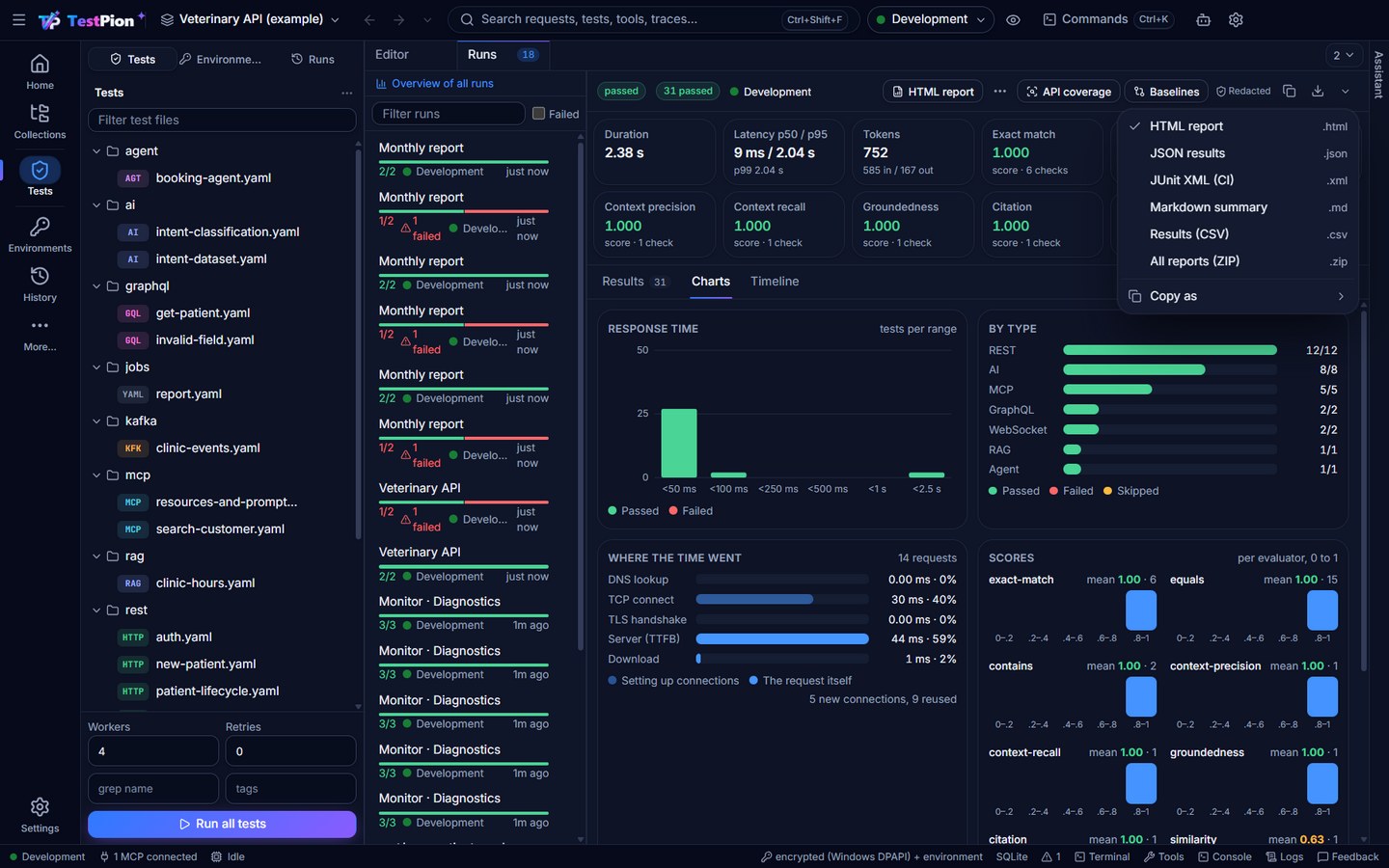
Save a run's reports. The down arrow at the right end of a run's results bar (in Tests, the collection runner and Evaluations) saves the HTML report with a click; its ▾ has JSON results, JUnit XML (CI), Markdown summary, Results (CSV) (one row per test: status, type, file, time, attempts, checks, error) and All reports (ZIP). It replaces the old Export ▾. A run in the Runs list has Export report… in its right-click menu, and the palette has Export Results for the latest run: both save the HTML report through the Save as dialog. Secrets are masked in every report as each result is recorded. See Save and export results.
In the editor, the preview of a test file shows each test's latest result and when it ran (click it to open that run). Select a result and open History to see the same test in the latest runs: whether it passed, its time per run (with the median) and the checks that failed, flagged as flaky? when the result keeps flipping, with Why is this flaky? (the pattern and a fix, proven by running the test 5 times); click a run to open it. testpion history test "<name>" and the test_history MCP tool give the same. With no run open, the Runs tab also lists the flaky tests of the workspace: those whose result changed two or more times over the latest 30 runs, or that passed only after a retry, each with its latest results as a strip (also testpion history flaky, which exits 1 when there are any, and the flaky_tests MCP tool).
In the app, a finished run has a Charts tab next to its results: how many tests fell in each response-time range (passed and failed), results per test type, the five slowest tests (click one to find it in the results), flaky tests (passed only after a retry), where the time of HTTP and GraphQL requests went (DNS lookup, TCP connect and TLS handshake on new connections, waiting for the server, download; also in the run_breakdown MCP tool), the checks that failed most and, for AI evaluations, how the scores of each evaluator spread from 0 to 1 with their mean.