
Features
TestPion combines an API client, a GraphQL playground, an MCP inspector, an LLM playground, an evaluation lab, a test runner, a load tester and a trace viewer. They all share one execution engine, which the testpion CLI also uses.
REST and HTTP
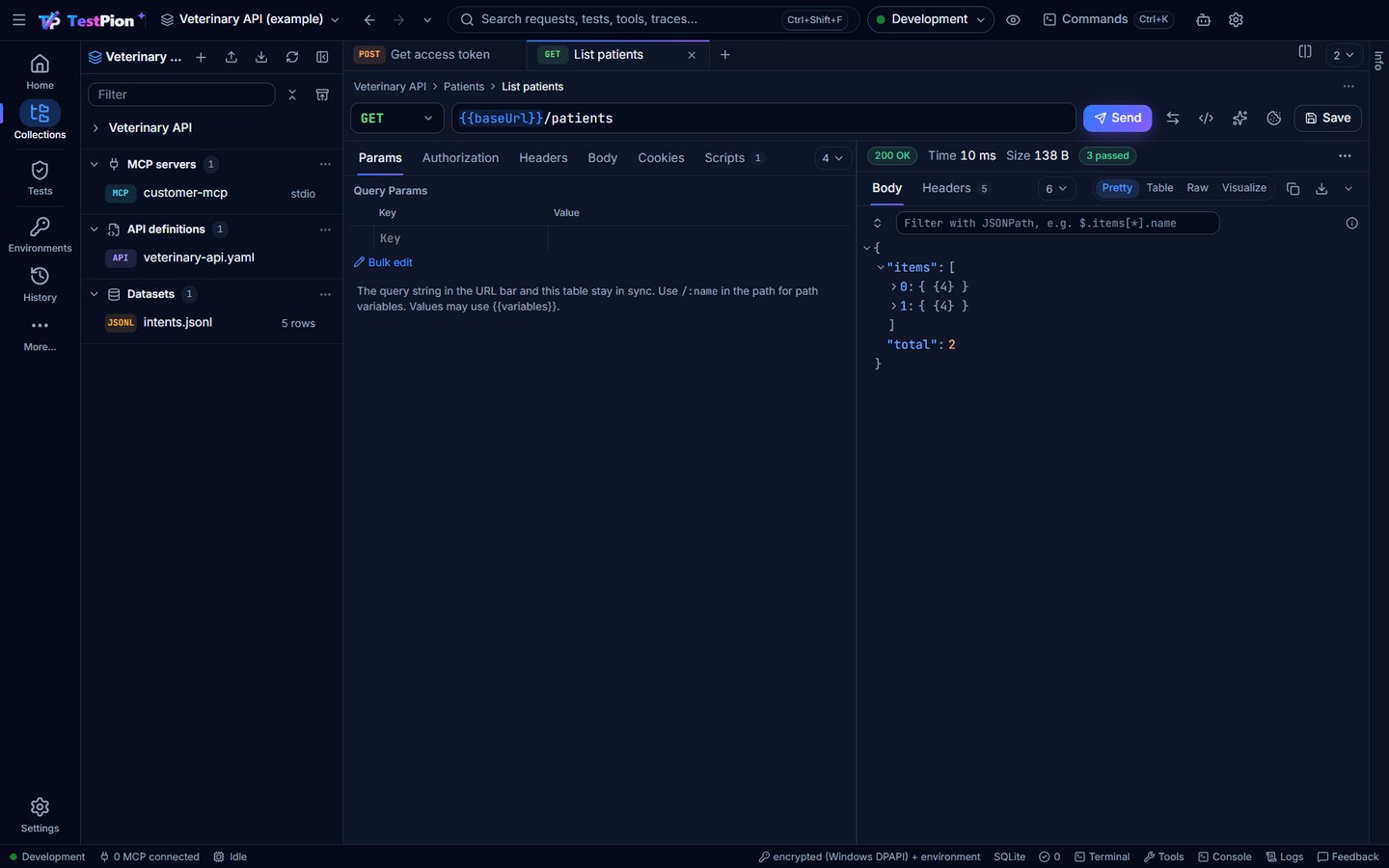
- Any method, params, headers and cookies; JSON, XML, text, HTML, form, multipart and binary bodies.
- A per-workspace cookie jar, like Postman's: cookies from responses (including redirects) are sent with later requests and managed in a Cookies dialog. The jar is encrypted on your machine and never written to workspace files.
- API key, Basic, Bearer, JWT, OAuth 1.0, OAuth 2.0 (client credentials, password, authorization code with PKCE), AWS Signature v4, Digest, custom headers and mTLS, inherited from folders and collections.
- Responses as a virtualised JSON tree, raw text with search, or an HTML preview, plus headers, cookies and a timing breakdown. Large bodies stream to disk.
- Save responses as examples of a request (success and error cases), with secrets masked. Postman saved responses import as examples.
- Mock servers on localhost serve a collection's examples, from the app or with
testpion mock, with fresh fake data from dynamic variables and optional forwarding of everything else to the real API (partial mocking). An imported OpenAPI document can be mocked straight away. - Postman compatibility: collections (v2.0 and v2.1) and environments import with their scripts, converted to
tp.*(Keep pm.* in scripts, ortestpion import --keep-pm, keeps them as they are). Scripts written for Postman (pm.*) also run unchanged;tp.*, lodash, moment, tv4,xml2Jsonand ~75 dynamic variables work in scripts;testpion run-collectiontakes Newman's command-line options. - Insomnia (v4 and v5, with scripts and template tags), Bruno (scripts converted to
tp.*, the.envread into the secret store), Hoppscotch and GraphQL schema imports. Nothing is dropped silently: an auth scheme TestPion lacks becomes No auth (never the parent's) with a reminder header, and every import lists what to check (Import fidelity). Export ▸ The whole workspace writes one<name>.testpion.jsonwith specs, datasets, mocks and protos, and every typed-in secret replaced by a variable (Export the whole workspace). - OpenAPI in both directions: import (with contract checks and response examples), generate a document from a collection, find breaking changes between two versions (
testpion openapi-diff, also as a pull-request check in generated CI pipelines), lint a document for broken references, undeclared parameters and examples that don't match their schema (testpion openapi-lint, the definition's Lint tab), and measure API coverage: which operations and documented responses the tests exercised (testpion coverage --min 80, the API coverage dialog, theapi_coverageMCP tool). - Security review of a collection (typed-in secrets, secrets in URLs, plain http) and a security-headers check for responses.
- Find where a variable is used and rename it everywhere, with secret values moved along.
- Markdown docs for every request and a generated documentation page per collection, exportable as Markdown or as a self-contained HTML page to publish (also
testpion docs --html). - Capture traffic with the HTTP Debugger (or its reverse proxy for one API) and Save to collection…: a folder per host or path, addresses as collection variables, secrets never saved.
- Pre-request and test scripts in a sandbox (with top-level
await,tp.requirescript packages,tp.vault, cheerio, lodash and moment), assertions, highlighted variables, one-click cURL export, code snippets for 19 languages and libraries (cURL, HTTPie, PowerShell, fetch, Axios, Python requests and httpx, Go, Java OkHttp and HttpClient, Kotlin, C#, PHP, Ruby, Rust, Swift, Dart, raw HTTP), a response Visualizer (tp.visualizer), paste-to-request (cURL, fetch and PowerShell from browser devtools, and HTTPie or xh commands), and a console with every request and its script output. - Back and Forward in the top bar (Alt+← / Alt+→, mouse buttons) return to the views and items you had open, with a list of recent places.
- The Collections sidebar (Collections on the rail, or Ctrl+B) is the one sidebar of the request editors, titled with the workspace name. It lists the workspace's collections; expanding one shows what it holds by category: REST, SOAP, GraphQL, gRPC and WebSocket & MQTT, each with its count, its folders and a + that creates that kind of request in the collection. SOAP requests are recognised by their XML envelope or SOAPAction header. Every saved request is in a collection, gRPC calls and WebSocket / Socket.IO / MQTT / Kafka connections too: saving a new one asks for its collection (or a new one) and folder, the same dialog as a REST request's, and their menu (or a drag onto another collection) moves them. Deleting a collection takes its gRPC calls and connections with it to Recently deleted, and restoring it brings them back. Unsaved tabs of every kind still send and connect without saving. Below the collections come the workspace-wide MCP servers (with their connection status) and API definitions. Every item opens in its own tab, like a request: an MCP server with its transport and command or URL, Connect, Save and a Settings tab; an API definition with its document (editable, with lint markers as you type), a Preview that reads like its docs and Generate tests writes a first suite from (operations by tag with parameters, request body and responses, schemas as short type outlines, and Open as request), its Lint problems, Fuzz (each operation sent invalid input one rule at a time: server errors, invalid input accepted, undocumented statuses;
testpion fuzz), its Coverage and Compare versions.testpion openapi-ops <spec>lists the operations in a terminal and agents get them fromopenapi_outline. Ctrl+S saves the tab on screen, whatever it holds. One filter searches everything, and clicking an item opens it in its editor.- The header has New, Import, Export (a collection in TestPion, Postman, OpenAPI or Bruno format, or the whole workspace), Refresh and Hide; drag its right edge to resize it. Collapse all and Recently deleted (collections, datasets, API definitions and MCP servers deleted in the last 30 days) sit beside the filter.
- Every row has a menu (right-click or ⋯): a collection's has Run collection, Monitor on a schedule…, Run in CI…, Create test file from collection…, New … request, Rename, Duplicate (with its gRPC calls and connections), Delete… and its settings, in one group order everywhere (create · open · run · test · configure · copy · organize · delete); category rows, requests, folders, gRPC calls, connections, MCP servers and API definitions have theirs. Renaming happens in place: F2 on the focused item (or Rename in its menu, or a double-click on a tab) turns its name into a text field; Enter or clicking away saves, Esc cancels. This works for collections, folders, requests, gRPC calls, connections, MCP servers, environments, tabs, the sidebar lists (monitors, load tests, saved prompts …) and saved examples. In every tree and list, ↑ ↓ move, Home / End jump to the first and last row, → opens and ← closes a folder. Delete deletes the focused request or folder; requests, folders, gRPC calls and connections can be dragged to another place or collection.
- Running a collection runs everything it holds, its gRPC calls and connections included, and exporting it in TestPion's format shares them too.
- Above every editor, a breadcrumb (Collection › Folder › Request) shows where the open item is saved.
- The views with items of their own (Tests, Monitors, Load, AI Lab, Evaluations) share one sidebar layout: their saved items with folders, Environments to switch or edit the active environment, and History or Runs for that view.
- Star frequently used REST or GraphQL requests from their ⋯ menu, then use the star button beside the collection filter to focus the Collections explorer on favorites. Favorites are saved in the collection file and retain their folder context.
REST guide · Authentication · Collections & import
GraphQL
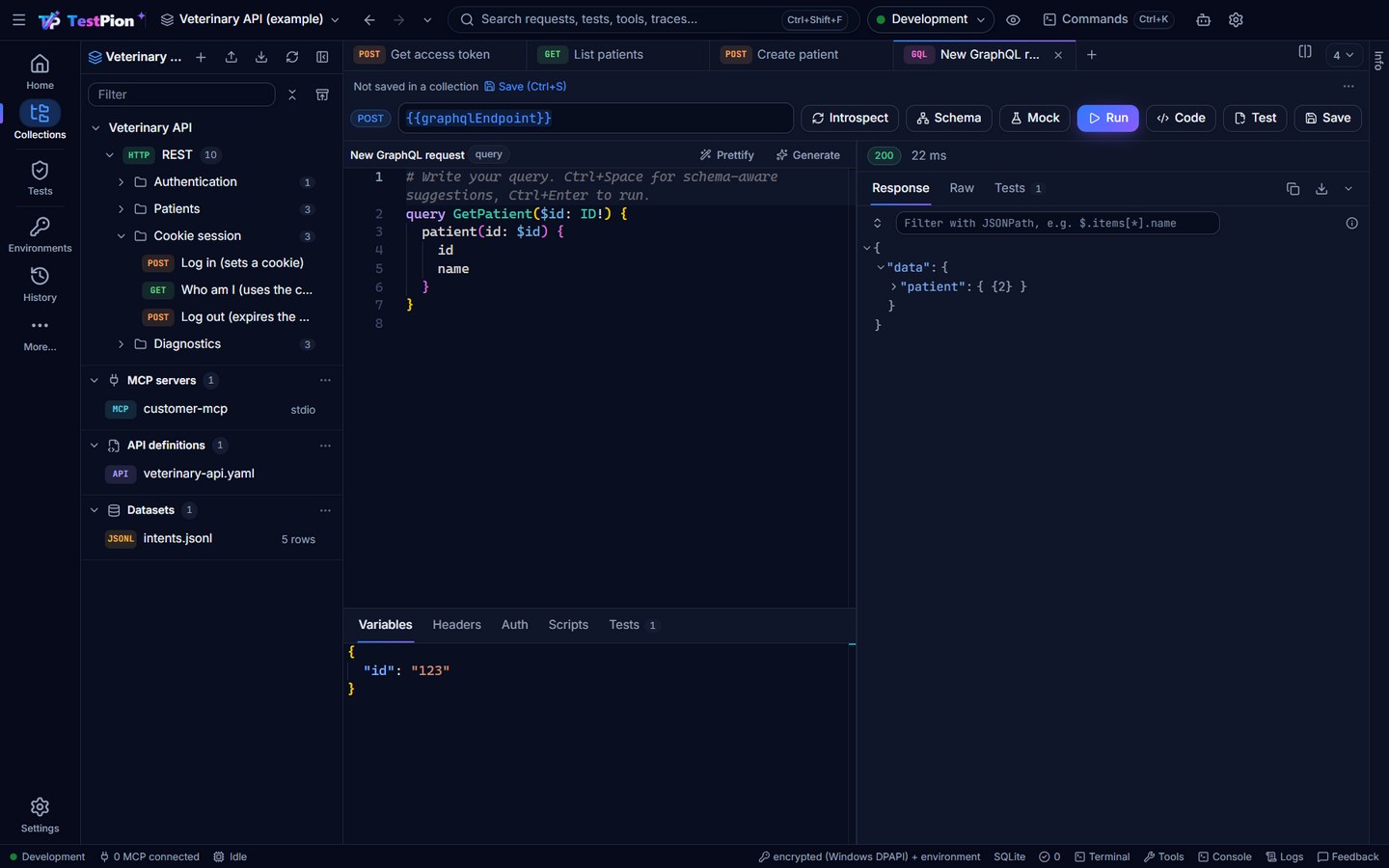
Introspect a schema to get autocomplete, validation and hover docs in the editor, plus a browsable schema explorer. Run operations with variables, scripts and assertions on data, GraphQL errors and latency, and run subscriptions over WebSocket (graphql-transport-ws and graphql-ws) with events listed live. Build writes a whole operation for a root field (typed variables, a selection of fields), and Code shows the call as cURL, fetch, Python and more.
gRPC
- Calls services described by
.protofiles; imports and Google's well-known types resolve. - Unary, server-streaming, client-streaming and bidirectional methods, with example messages.
- Metadata, TLS (
grpcs://) and deadlines. - Streamed responses appear live; Stop keeps what arrived.
See gRPC.
WebSocket, Socket.IO, MQTT and Kafka
- WebSocket with subprotocols and handshake headers; Socket.IO events with acknowledgements.
- MQTT 3.1.1 and 5 brokers (mqtt://, mqtts://, ws://, wss://): subscriptions with wildcards and QoS, publish with QoS and retain.
- Kafka clusters (kafka://, kafkas://, SASL PLAIN / SCRAM): read topics from the beginning or new messages in a consumer group of its own, produce with key and headers, list topics.
- A live message log with a filter and JSON tree, saved connections in folders, and saved messages to send again.
type: websocket,socketio,mqttandkafkatests,testpion ws,testpion mqttandtestpion kafka, and therealtime_exchangeMCP tool.
See WebSocket.
MCP inspector
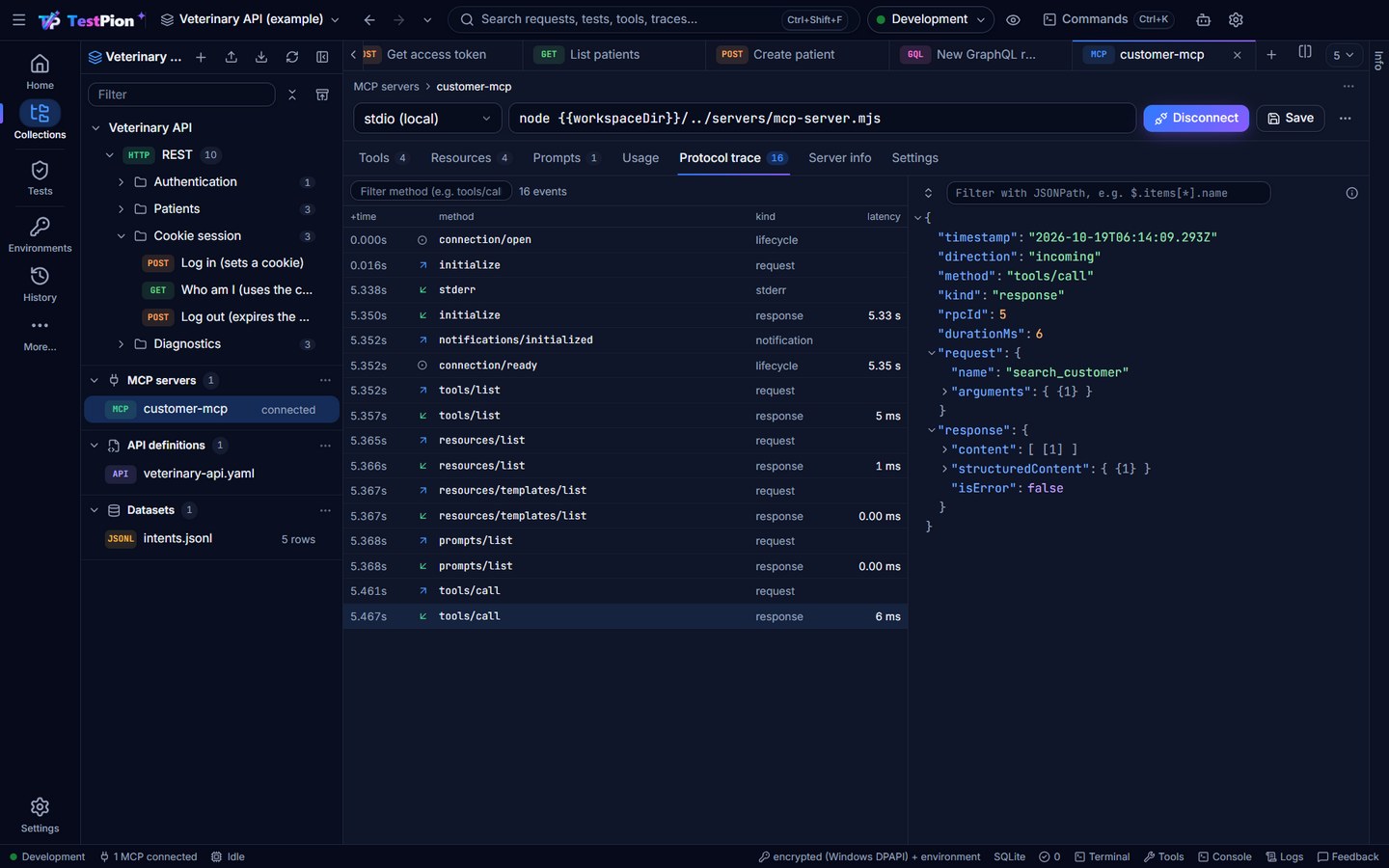
- stdio, Streamable HTTP and SSE transports.
- Tools, resources, resource templates and prompts, with input forms generated from JSON Schema, the server's suggestions (completions) for arguments, and resource subscriptions.
- Elicitation, sampling and roots: answer a server that asks for input (a form from its schema) or for an LLM completion (reviewed before anything is sent), in the inspector and in tests.
- A protocol trace of every JSON-RPC message, with direction, payloads and latency.
- Save as test… turns a tool call into a regression test.
- A mock server's Tools tab designs a toolset (name, description, input schema, canned or scripted answers per tool), tries it in place, and shows the commands that serve it to an agent before the real server exists; Generate with AI drafts it from a sentence. See MCP mock server.
- The other direction too:
testpion mcp-serverserves your workspace to AI agents as MCP tools (browse collections, send requests, run collections), with secrets redacted. - Your flows as tools: a test file or suite with an
expose:block (Tests ▸ file menu ▸ Expose as MCP tool…) is a tool of its own on that server: an agent calls it by name with the inputs as arguments and gets each step's result and the values the flow extracted.testpion flowsand Settings ▸ AI agents list them.
MCP guide · Use from AI agents
AI Lab and model comparison
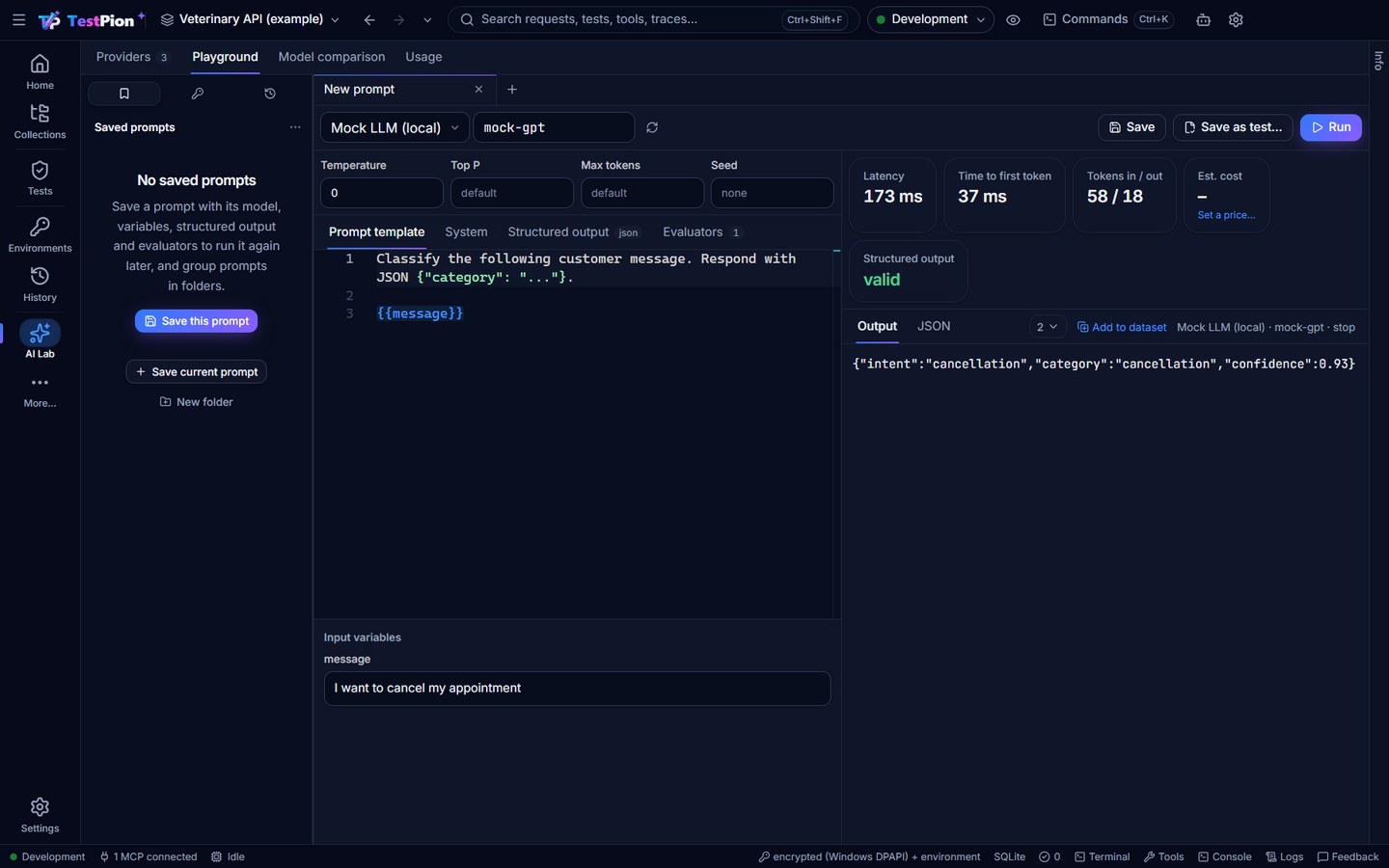
Prompt templates with variables, JSON mode and JSON Schema outputs, and streaming with time to first token. Token counts and estimated cost from a price table you control. Compare models side by side without a one-size-fits-all ranking (the fastest and the cheapest are marked). Providers include OpenAI-compatible, Azure OpenAI, Anthropic, Gemini, Amazon Bedrock, Ollama and an offline mock; a provider without its key says so before anything is sent, with Add the key one click away. An answer worth keeping becomes an evaluation case with Add to dataset.
AI that writes tests and flows, under your control
Your Claude key or a model on your computer (Ollama, LM Studio) writes the tedious parts: an integration flow from a collection or folder (right-click ▸ Generate integration flow with AI…: its saved requests in create → read → update → delete order, ids passed between steps, checks and error cases), suggested checks and tp tests for a response, a request from words, explanations of errors and failed tests. Explain and fix failures with AI… on a failed run groups the failures by cause without AI (500 failures from one expired token are a few groups), then explains each cause with its evidence — the request, the response, what changed since the test last passed — and a fix it proved against the failing and the last passing response (or a bug report when the API regressed); Why is this flaky? names a flaky test's pattern (timing, shared state, a rate limit …) and a fix that never hides a failure, and Attempt to fix runs the test 5 times to show it is stable. Everything it writes is a proposal, verified before you see it — checks run against the response and the one before it (a value that changes is flagged with a safer form), tests run in the sandbox, flows are linted and tried on a mock — and reviewed before it is added, with Undo. What will be sent… shows the exact messages first; privacy levels, Local only and stronger masking keep secrets and personal data out; cost caps and the AI features usage view keep the bill in sight. The same from the terminal (testpion ai …, testpion flow generate, testpion ai triage, --triage on a CI run) and for agents (ai_run_task, flow_generate, ai_triage_run, ai_analyze_flaky).
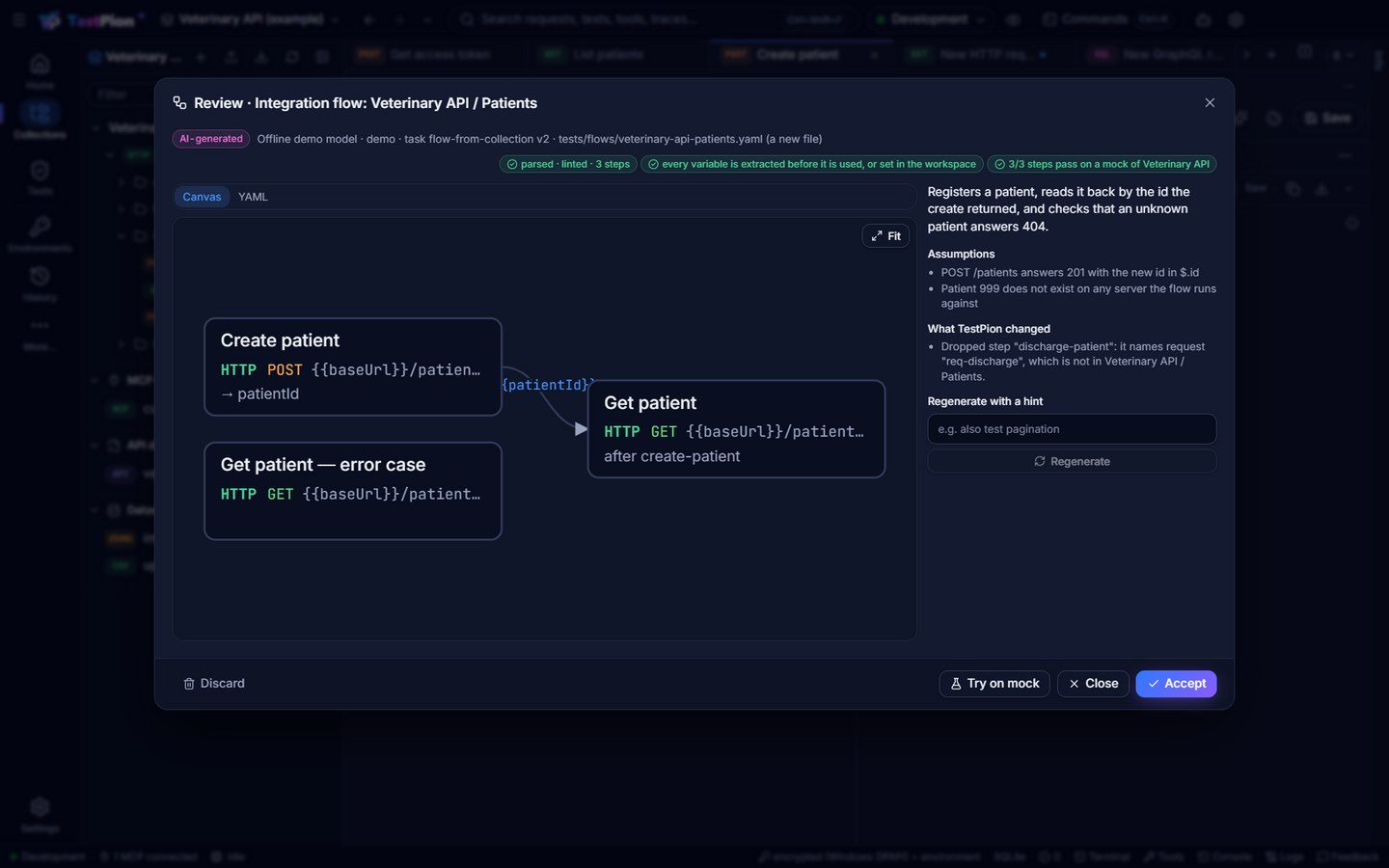
AI features: privacy, cost and review · Let AI write the flow
Evaluations
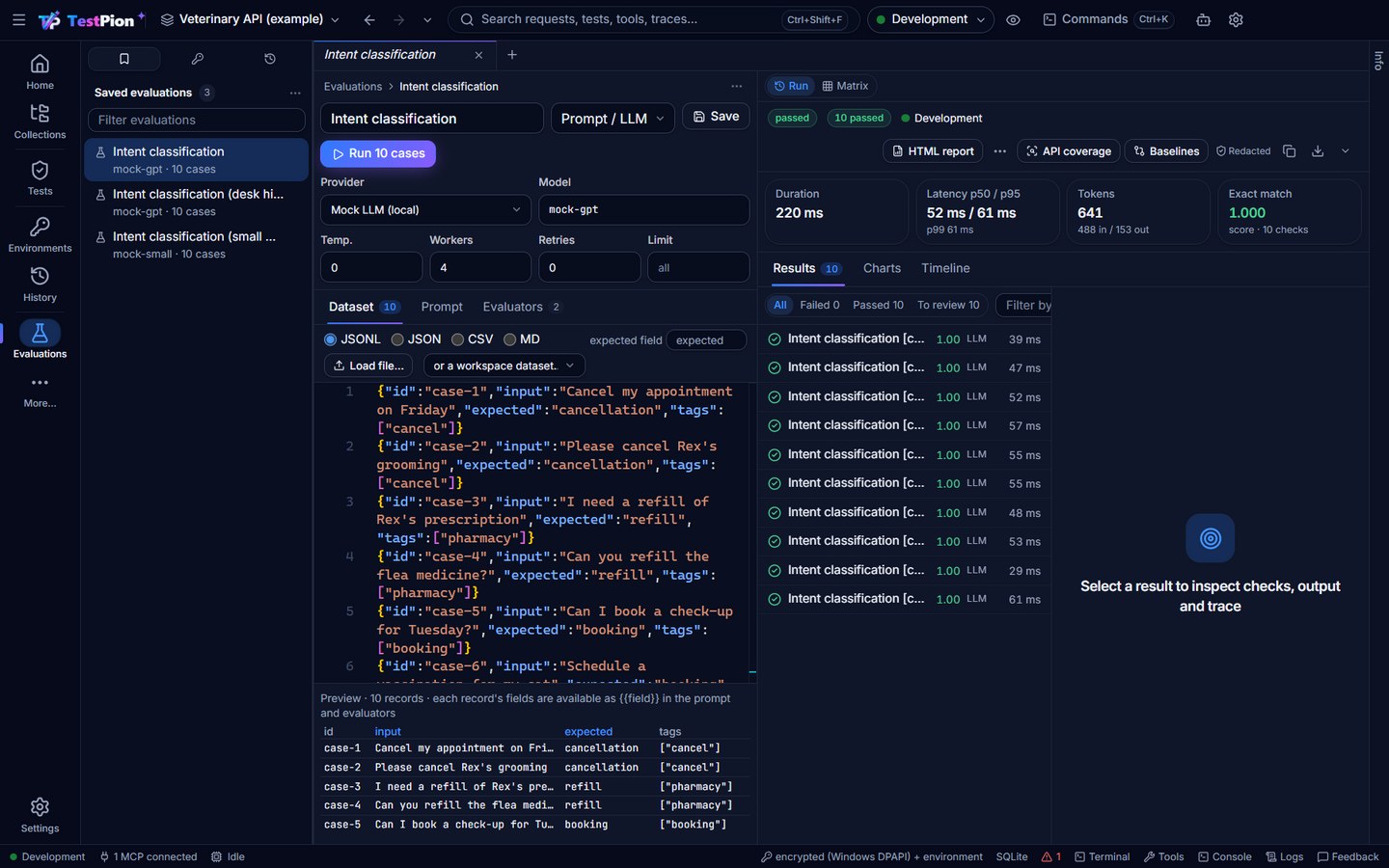
Stream JSONL, CSV, JSON or Markdown datasets through evaluators. Deterministic evaluators cover exact match, JSON Schema, regex and thresholds. Heuristic and semantic evaluators cover similarity and RAG metrics; with a judge, the RAG checks work claim by claim (faithfulness, context precision and recall, answer correctness), each verdict with its evidence. LLM-as-judge scores are clearly labelled and reproducible. Also included: agent tool-use checks, safety checks (prompt injection, data leakage, tool misuse), baselines for regression tracking, and human review: 👍 / 👎 and a note on any result, kept beside the run and read by agents. Matrix compares runs side by side (cases × variants, coloured against a baseline run by regression or improvement); testpion eval compare <run> --baseline <run> fails a CI job on regressions.
Evaluations · RAG · Agents · Safety
Test runner and CI
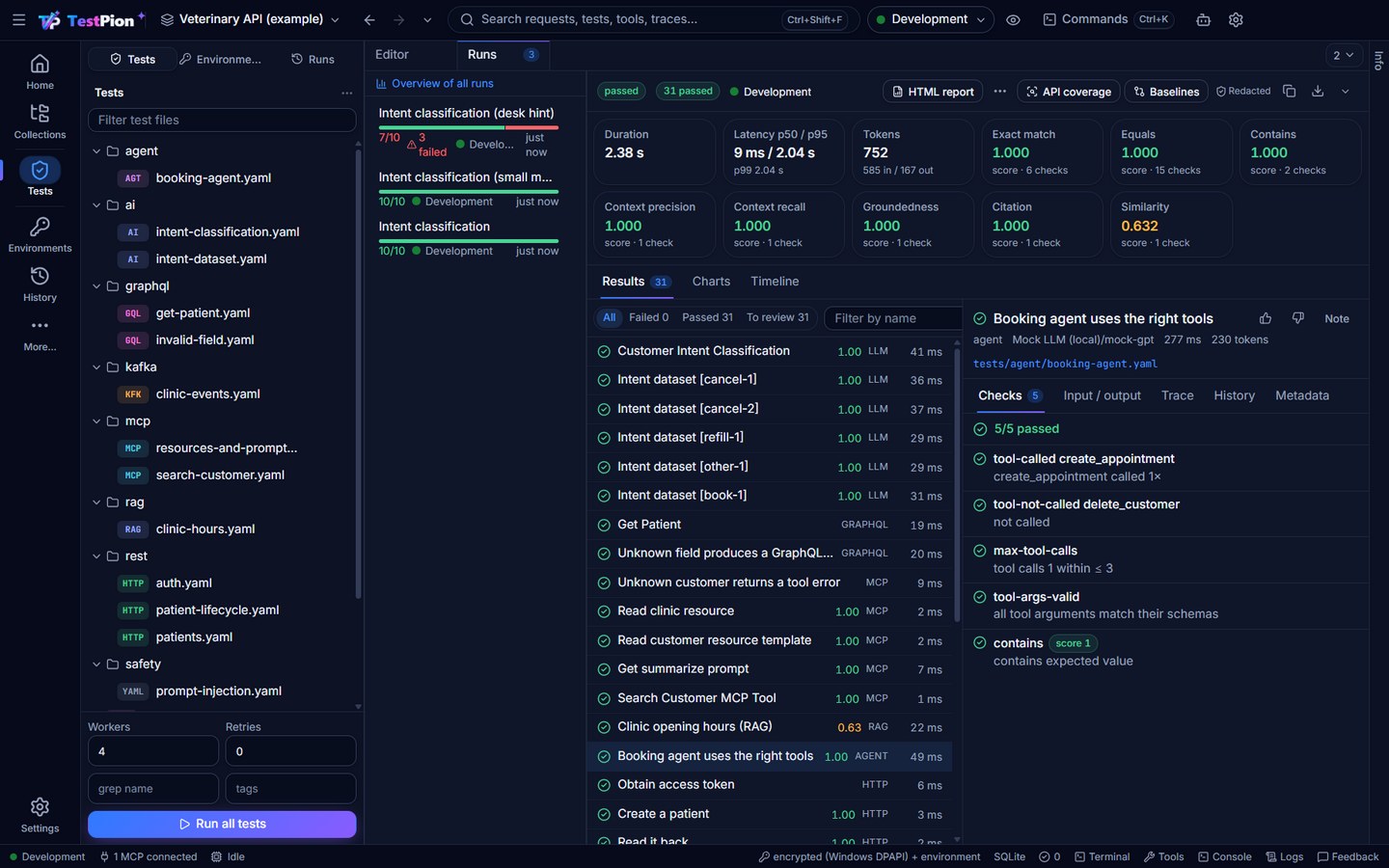
YAML tests in your repository, with parallel workers, backpressure, retries, timeouts, dependencies, setup and teardown, and runs you can cancel and resume. Datasets (CSV, JSONL, JSON, Markdown tables, SQLite) drive tests and collection runs: a sidebar section lists them with their row counts, and each opens in a tab with a preview table (column types), the file in the editor, Run a collection with this dataset and Use in a test; testpion datasets show and the read_dataset MCP tool read the same rows. An API definition or a collection generates a first suite — a test per operation, or an integration suite with a flow per resource (create, read, update, list, delete). Every run writes JUnit, JSON, HTML and Markdown reports. The CLI returns CI-friendly exit codes. A test file's preview shows each test's latest result; a result's History shows the test across runs, and the runs overview lists the flaky tests of the workspace and, for evaluations, each evaluator's score by run.
Save as test… is in every place that names a request (an editor's ⋯, the Collections menu, History, the HTTP Debugger, the MCP view, the AI Playground; testpion test from-request), and Rerun last run (Ctrl+Shift+R) runs the latest run again.
A test file's Flow tab is a visual flow designer. A flow starts at a Start node (its trigger and inputs); blocks for requests, GraphQL, gRPC, WebSocket, MCP tool calls, LLM prompts, Delay, Condition, For each / Repeat, Script, Sub-flow, Log, Wait until, Set variable, Assert, Finally, Parallel groups and Output come from a searchable picker, from a collection, by dragging from the Collections explorer, History or the Debugger, from a recording in the HTTP Debugger, or from AI. Connect steps port to port, see which variables flow along each connection, edit each step in an inspector, run the flow or one step and watch the steps light up, with undo and redo, notes, frames, a minimap and a live problems strip; every change is written to the YAML (comments and line endings kept). testpion flow edit <file> --op '<json>' and the flow_* MCP tools make the same edits, and testpion flow <file> --json|--dot and flow_graph read the graph. Design a flow
Debug a flow with breakpoints (F9), step over, every step's variables on a timeline slider, Run from here / Run to here and a history of its runs. Run it at scale: once per data row (CSV, JSON, JSONL, SQLite, PostgreSQL / MySQL) with a live grid of rows, in several environments side by side, as the scenario of a load test, and as a Timeline with the critical path (the down arrow saves it as one HTML file). Deploy it: on a schedule (a monitor), behind a webhook (testpion serve flows), as an MCP tool, or in CI (Deploy ▸ CI, with data rows, an environment matrix and an HTML timeline). Debug a flow · Run a flow at scale · Deploy a flow
Arazzo 1.0 (the OpenAPI Initiative's workflow format) comes in and goes out: importing an Arazzo document writes one flow file per workflow (operations from its OpenAPI documents, runtime expressions as variables with the extracts that set them, success criteria as checks, retries; what does not fit stays as a comment and in the summary), and Export as Arazzo… in the Tests tree (testpion flow export <file> --arazzo, the import_arazzo / export_arazzo MCP tools) writes a flow back as a workflow. Arazzo workflows
In git, flow files are compared by meaning like collections: steps added, removed, renamed or changed with the parts (request line, headers, body, extract, checks, if, forEach), connections added or removed, and "rearranged" when only the layout moved; in the Git view, pull-request descriptions and testpion diff --json. Flows, step by step
Load testing
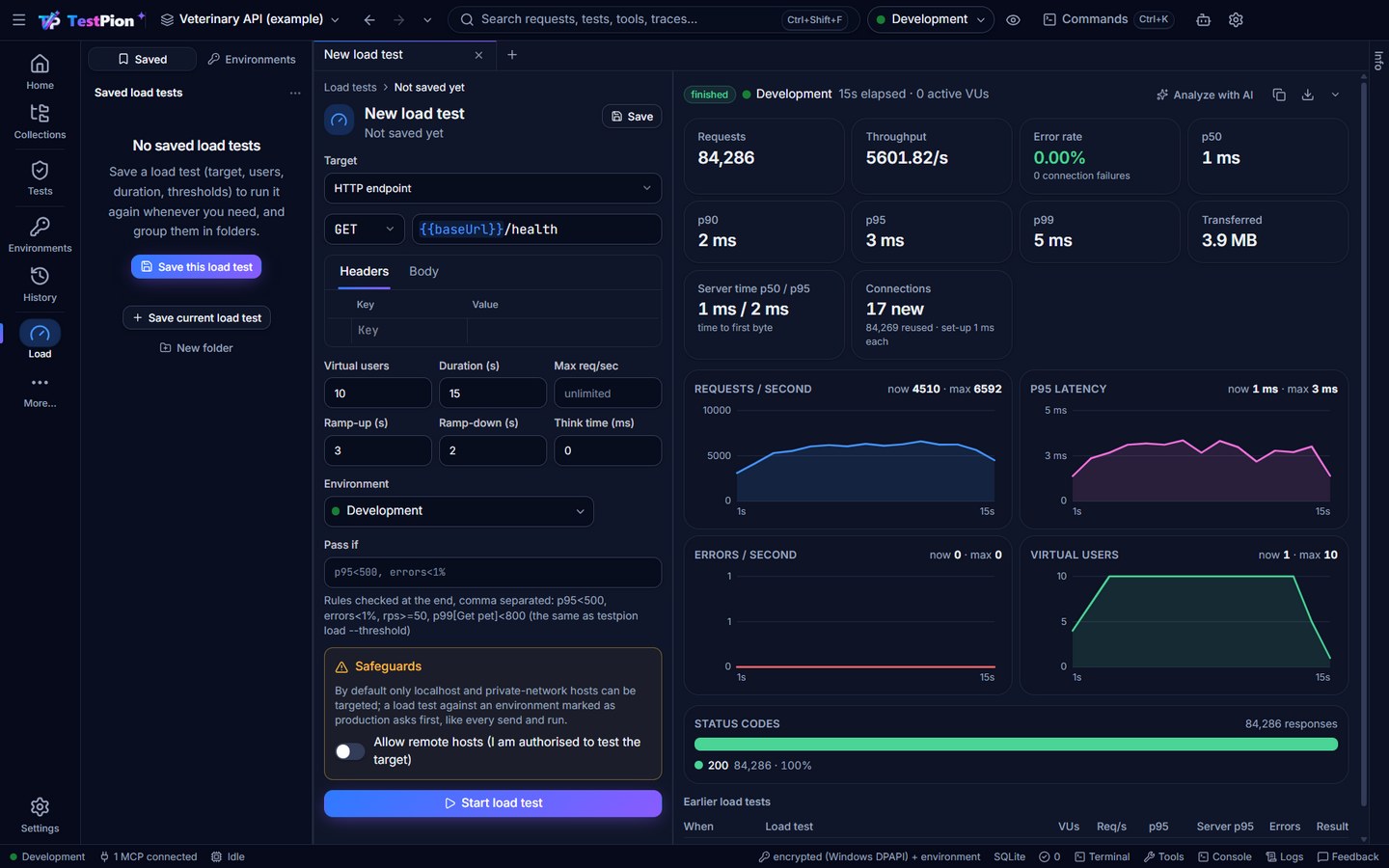
Load-test one endpoint, a gRPC method, a whole collection (every virtual user runs its requests in order, with per-user cookies and an optional warm-up run for tokens) or a flow (every virtual user runs the whole test file). Configure virtual users, ramp-up and ramp-down, and an RPS cap. See p50–p99 latency, error rate and status distribution, per request for collections, plus AI metrics (tokens/s, TTFT, cost) for LLM targets. Pass/fail thresholds (p95<500, errors<1%, p99[Get pet]<800) fail a CI job on a slow build. Safeguards block remote hosts unless you opt in, and a production environment asks before any data-changing request (--allow-production in the CLI).
HTTP Debugger
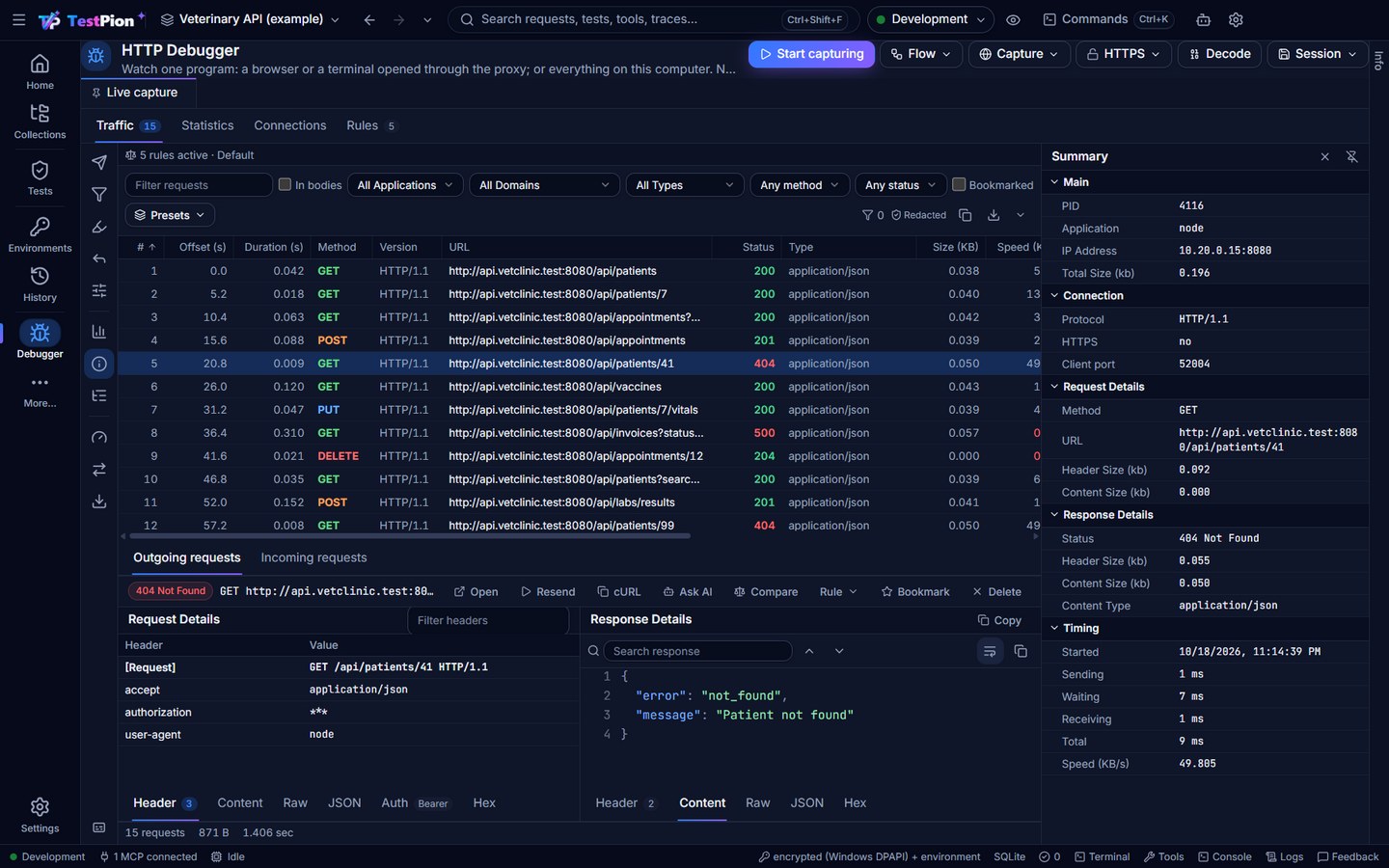
See the traffic of other programs (a browser, an app under test, a service, an agent) through TestPion's local proxy: a grid with the program, status, type, size, speed, domain and server address of every request; the request and response side by side; HTTPS decryption, HTTP/2, gRPC, WebSocket frames and Server-Sent Events. Rules filter, capture only, highlight, modify, auto-reply, redirect or pause the traffic; panels show its timeline, summary, structure and performance; sessions save as HAR. Requests your programs send to TestPion's mock servers are listed too. Capture chooses what to capture (a browser, a terminal, a phone, or everything on this computer); selected exchanges become requests (Save to collection…) or a flow (Create flow from selection…, Flow ▸ Record a flow…). testpion debug and the debugger_* MCP tools do the same from a terminal or an agent.
Traces
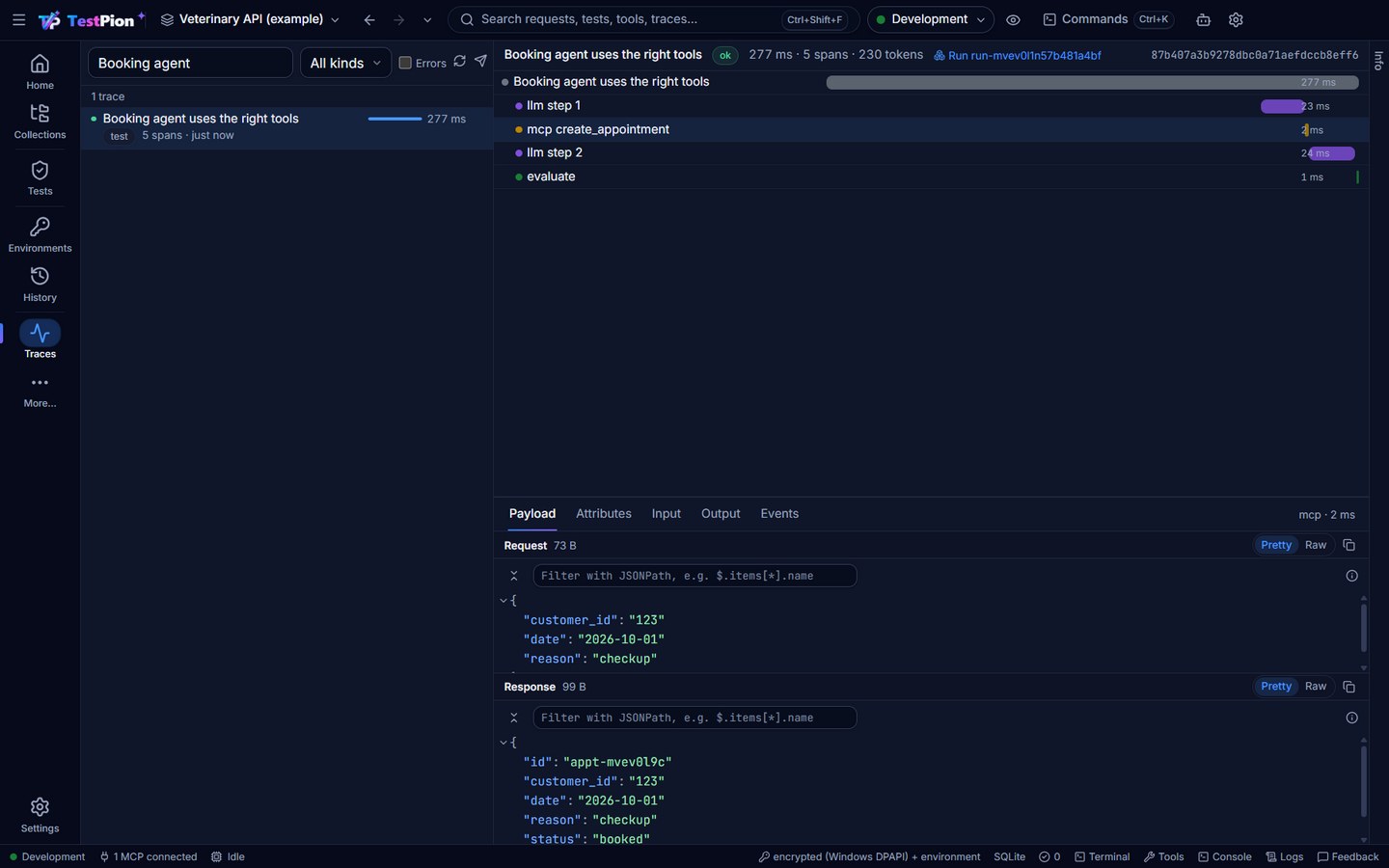
Every request, GraphQL operation, MCP call, LLM call, tool call and evaluation becomes a span in an OpenTelemetry-shaped trace, shown as a waterfall with inputs, outputs and attributes. Traces can be sent to Jaeger, Grafana Tempo, Honeycomb or any OpenTelemetry collector (OTLP), from the app or during CLI runs (--otlp, or the standard OTEL_EXPORTER_OTLP_* variables). See traces.
Workspace and productivity
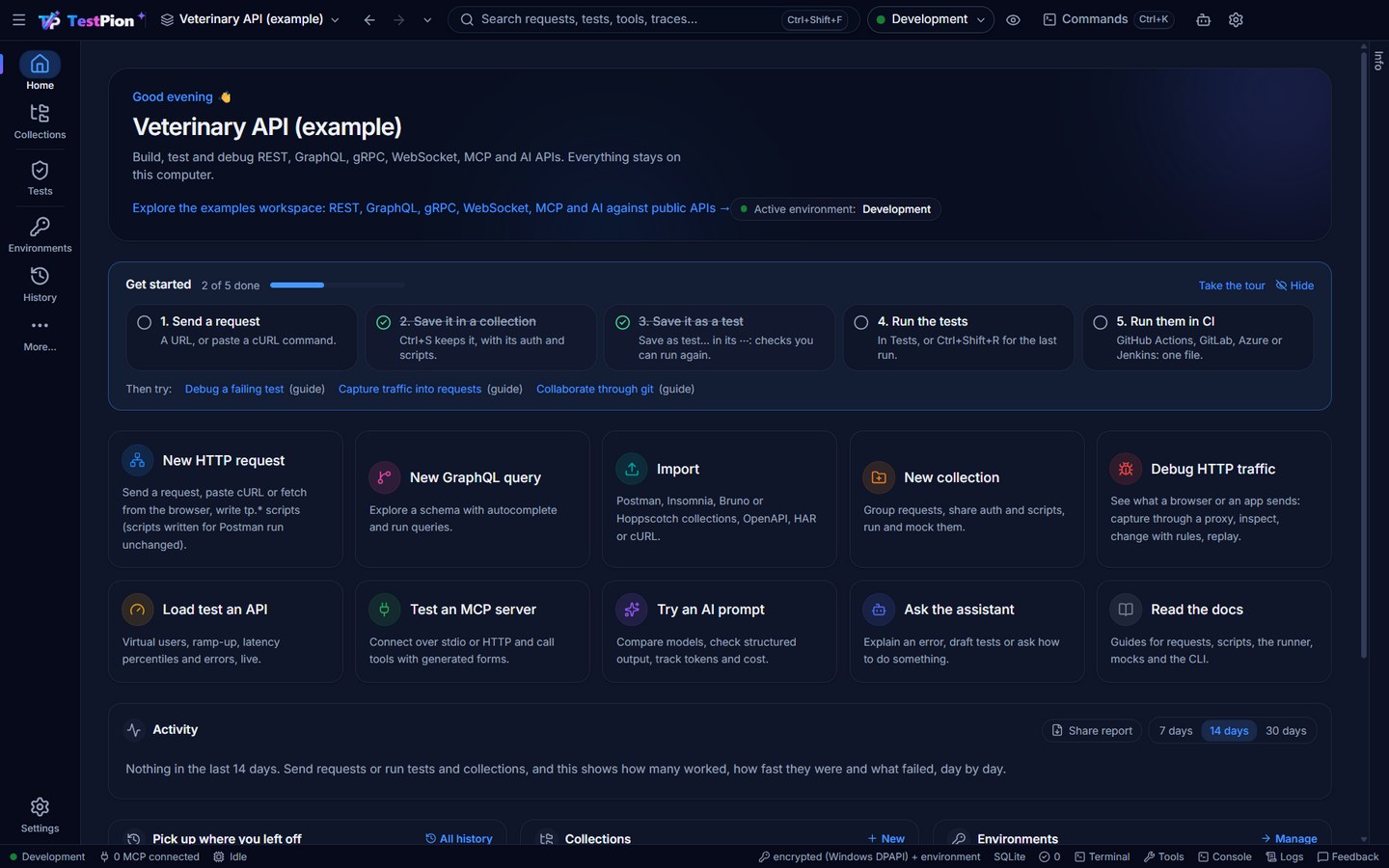
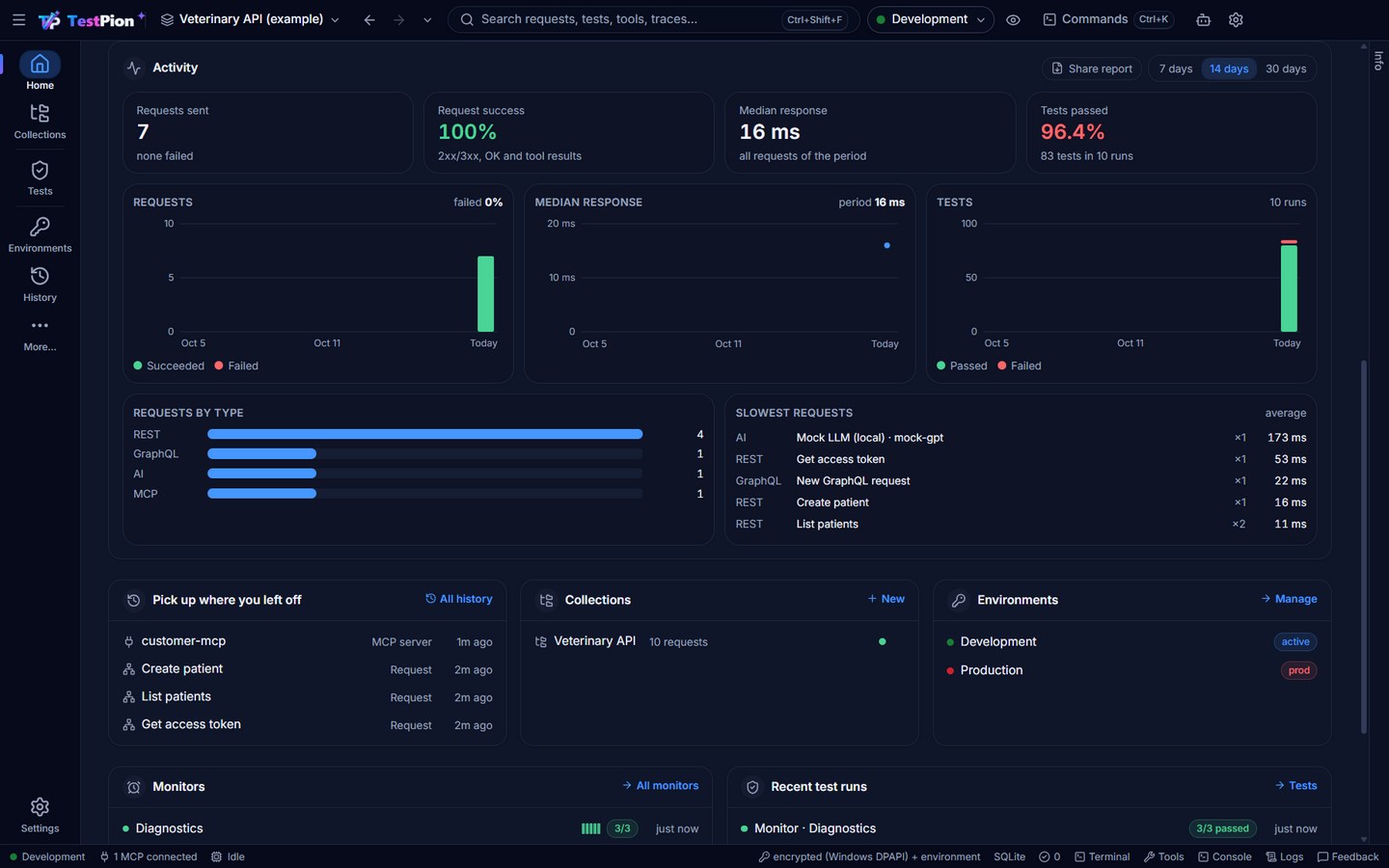
A Home view with quick actions, a Needs attention card (failing monitors, certificates that expire within 30 days, the latest failed run, saved requests whose latest response failed and flaky tests; also testpion attention and the what_needs_attention MCP tool), an activity dashboard (requests sent and failed, median response time and tests passed per day over 7, 14 or 30 days, requests by type and the slowest requests; Share report saves it with each collection's health, the monitors with their uptime by day and the latest runs as one HTML file), recent work, collections, environments with variable precedence and a quick look, secret variables, searchable history grouped by day (with a bar of 2xx, 3xx, 4xx, 5xx and errors), global search, a command palette (Ctrl/⌘+K), an AI assistant that turns plain words into requests, writes tp tests, explains errors, slow requests and flaky tests (always labelled as AI-generated), and dark and light themes. Quick Open (Ctrl+P) finds any item by name, with > for commands and # for environments and variables; Problems gathers everything failing (the status bar counts it, F8 steps through it); the bottom panel has Console, Logs, Terminal (a shell in the workspace folder with testpion on the PATH) and Problems; the right edge has Info (the item's variables and where each comes from, its file and git state, its last runs) and the Assistant; the rail shows five views (Home, Collections, Tests, Environments, History) with More… for the rest, and you choose which (Ctrl+Alt+1…9 follow it); the app-wide shortcuts can be changed in Settings ▸ Keyboard; a Compact density fits more on screen; deleting something you can get back offers Undo instead of asking. The environment picker is one control everywhere, every run shows its environment, and an environment marked as production guards every send and run path: data-changing requests ask first, and a frame in its colour marks the window. Import from OpenAPI, Postman, Insomnia, Bruno (collection folders too), Hoppscotch, WSDL (SOAP services), AsyncAPI (Kafka, MQTT and WebSocket channels), .http files (REST Client, JetBrains HTTP Client) or HAR, and export collections and environments to Postman v2.1 (and collections to .http, OpenAPI and Bruno).
Save and export every output: the same down arrow at the right end of every response and result (REST, GraphQL, gRPC, message logs, MCP tool results, run results, timelines, grids, load results, the evaluation matrix, the console, the terminal, Problems, the HTTP Debugger) saves it as JSON, JSON Lines, CSV, Markdown, HTML, HAR, JUnit, ZIP or the raw bytes through the Save as dialog, with Copy beside it and Ctrl+Shift+S; logs are saved with secrets masked and big outputs stream from disk. Save and export results
Finding your way around · Terminal
Git
Workspaces are plain files made for git: the Git view lists changes by meaning (requests, and flows step by step), Pull & push merges collections request by request and pushes in one step (with a background fetch every 5 minutes and a count on the rail), conflicts are resolved request by request, and every open editor offers Keep mine / Take the new version after a pull. testpion git sync and the git_sync MCP tool do the same. Keep your workspace in git
For AI agents and scripts
testpion mcp-server serves the workspace to AI agents as MCP tools (--profile minimal and search_tools for agents that load every tool), with one contract for every tool (confirm: true before deleting, paged lists, concise results). testpion agents init writes AGENTS.md from the live workspace. Every CLI --json prints one envelope ({ schema_version, command, status, data, errors, warnings, metrics }), with --jsonl, --dry-run and --non-interactive. MCP server · CLI reference