
AI features: privacy, cost and review
TestPion's AI features — explain an error or a response, suggest checks, write tp tests, write an integration flow from a collection, explain and fix a failed run, find out why a test is flaky, fix lint problems, write a commit message and more — all run through one task runner in the engine. The app, the CLI (testpion ai …, testpion flow generate), the MCP server (ai_* tools, flow_generate) and CI use the same 29 tasks, the same privacy rules, the same caps and the same usage log.
Three rules hold everywhere:
- AI is an action you start. Nothing runs on its own, and nothing is sent before you click (or call) it.
- You see what is sent. The model, whether it stays on this computer, every section of the context, what was masked and the estimate — before it is sent.
- Nothing is saved until you accept it. A generated check, test, flow or request is a proposal, checked by the engine first and shown in a review; Undo puts back what an accepted proposal replaced.
What you get
| Where | AI action | What it gives |
|---|---|---|
| A request's response | Suggest assertions, Generate tests | Checks or tp.test scripts, each run against the response first (below) and reviewed before they are added. |
| Next to Send | Describe a request | A request from words, reviewed, then opened as a new unsaved tab. |
| Explorer: right-click a collection or folder | Generate integration flow with AI… | A flow file from its saved requests, tried on a mock and reviewed on a canvas (Let AI write the flow). |
| A flow's canvas | Generate with AI | The same, from a collection or folder or described in words. |
| A failed run: its ⋯ menu, right-click it in Runs, the Problems panel, Home's Needs attention | Explain and fix failures with AI… | The failures grouped by cause, each with evidence and a verified fix you apply, then Rerun the affected tests (below). |
| A flaky test: the Problems panel, a result's History tab | Why is this flaky? | The pattern with evidence and a fix; Attempt to fix runs the test 5 times (below). |
| Errors, failed tests, timelines, monitors, fuzz and security findings, API diffs, load tests | Explain with AI, How to fix (AI), Analyze with AI | An answer in the assistant panel. |
| Anywhere | Ctrl/⌘+J, Ask AI Assistant (Ctrl+K) | A free question about what is on screen (the assistant). |
| Git, Home | Write message, What to fix first | A commit message from the changes; the items of Needs attention in order. |
Every AI button is the same control: ✦ and its label, and beside it the eye — What will be sent…. Hovering the button shows the model, whether it stays on this computer and the token estimate.
Set up a model
AI features need a model; without one they say so and offer Set up AI (nothing is sent). Settings ▸ AI assistant, then Turn on the AI assistant and choose one of:
- Claude (Anthropic), with your API key — paste the key, Save key: TestPion checks it with Anthropic, then keeps it in the OS secret store, never in a file. See Your Claude API key.
- A provider of this workspace — any provider of AI Lab ▸ Providers: a cloud one with its key, or a model on this computer: Ollama (local) (
http://127.0.0.1:11434, no key) or LM Studio (local) (its OpenAI-compatible server onhttp://127.0.0.1:1234/v1, no key). With no provider selected, AI Lab ▸ Providers offers both (and the cloud ones) as one-click presets.
Then Save settings. A provider without its key answers with Add the key, which opens it in AI Lab ▸ Providers.
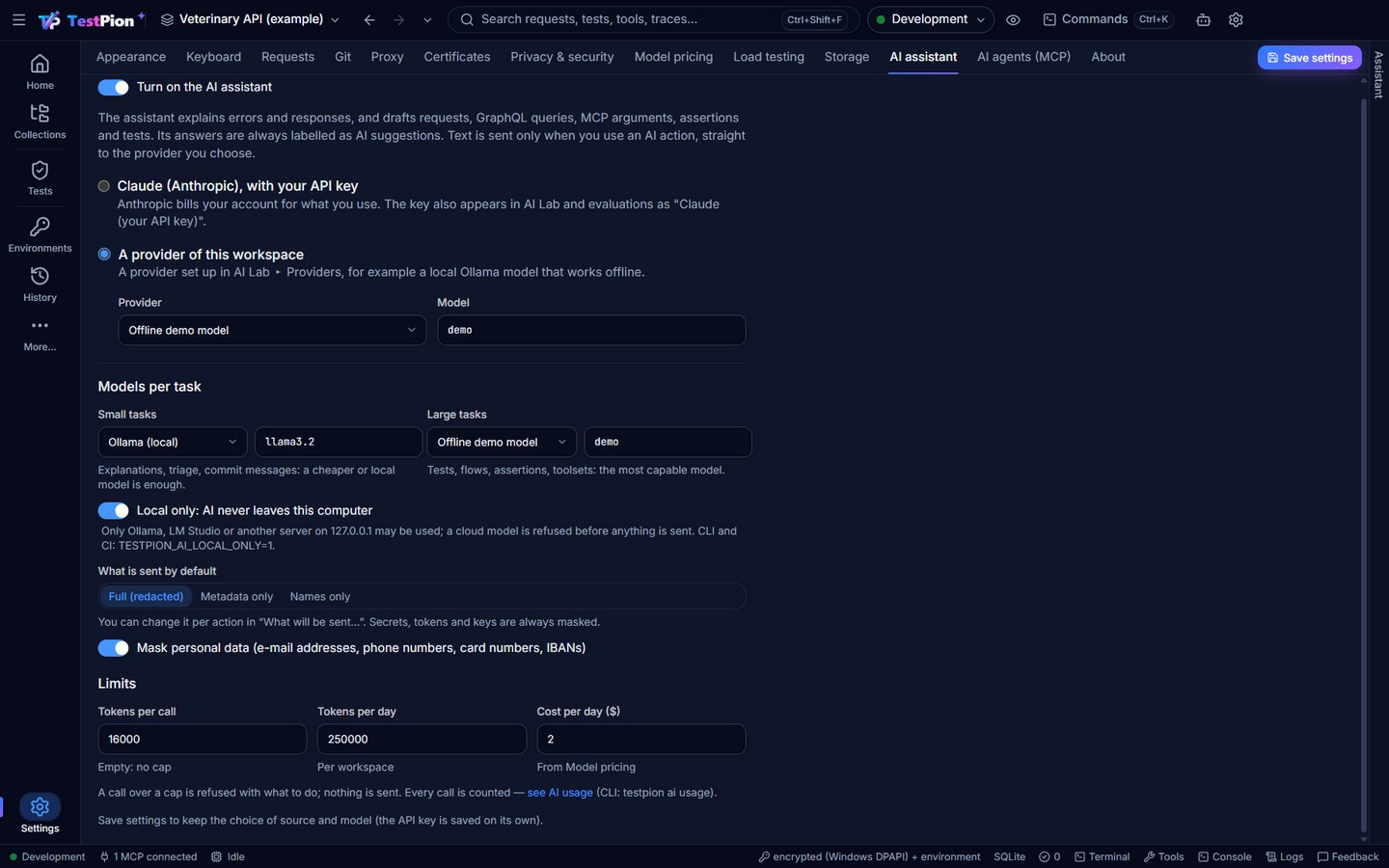
Models per task
Under Models per task:
- Small tasks (explanations, ordering Needs attention, a commit message, a request or tool arguments) can use a cheaper or local model.
- Large tasks (checks, tp tests, flows, coverage tests, explaining and fixing a failed run, why a test is flaky, a GraphQL query, toolsets, OpenAPI fixes) can use the most capable one.
Both default to the assistant's model (Same as the assistant). testpion ai tasks lists each task's tier.
Local only
Local only: AI never leaves this computer allows only Ollama, LM Studio or another OpenAI-compatible server on 127.0.0.1 / localhost, and the offline mock. A cloud model — or an Ollama on another host — is refused with Local only is on: … would send the context off this computer, before anything is sent — and before its API key is looked up, so a cloud provider without a key is refused for leaving the computer, not for the missing key.
From the terminal and CI
The CLI reads the same settings, and the environment overrides them:
| Variable | Effect |
|---|---|
TESTPION_AI_PROVIDER | The provider: a workspace provider's id or name, ollama, mock, anthropic (with ANTHROPIC_API_KEY), openai-compatible (with OPENAI_API_KEY), or claude-app (with TESTPION_SECRET_APP_ANTHROPIC_APIKEY). |
TESTPION_AI_MODEL | The model, for every task. |
TESTPION_AI_MODEL_SMALL / TESTPION_AI_MODEL_LARGE | The model of one tier. |
TESTPION_AI_LOCAL_ONLY=1 | Local only. |
--provider and --model on a command win over all of these. A workspace provider's key comes from TESTPION_SECRET_PROVIDER_<ID>_APIKEY (no keychain in CI). The MCP server uses the app's settings.
What is sent, and how to see it first
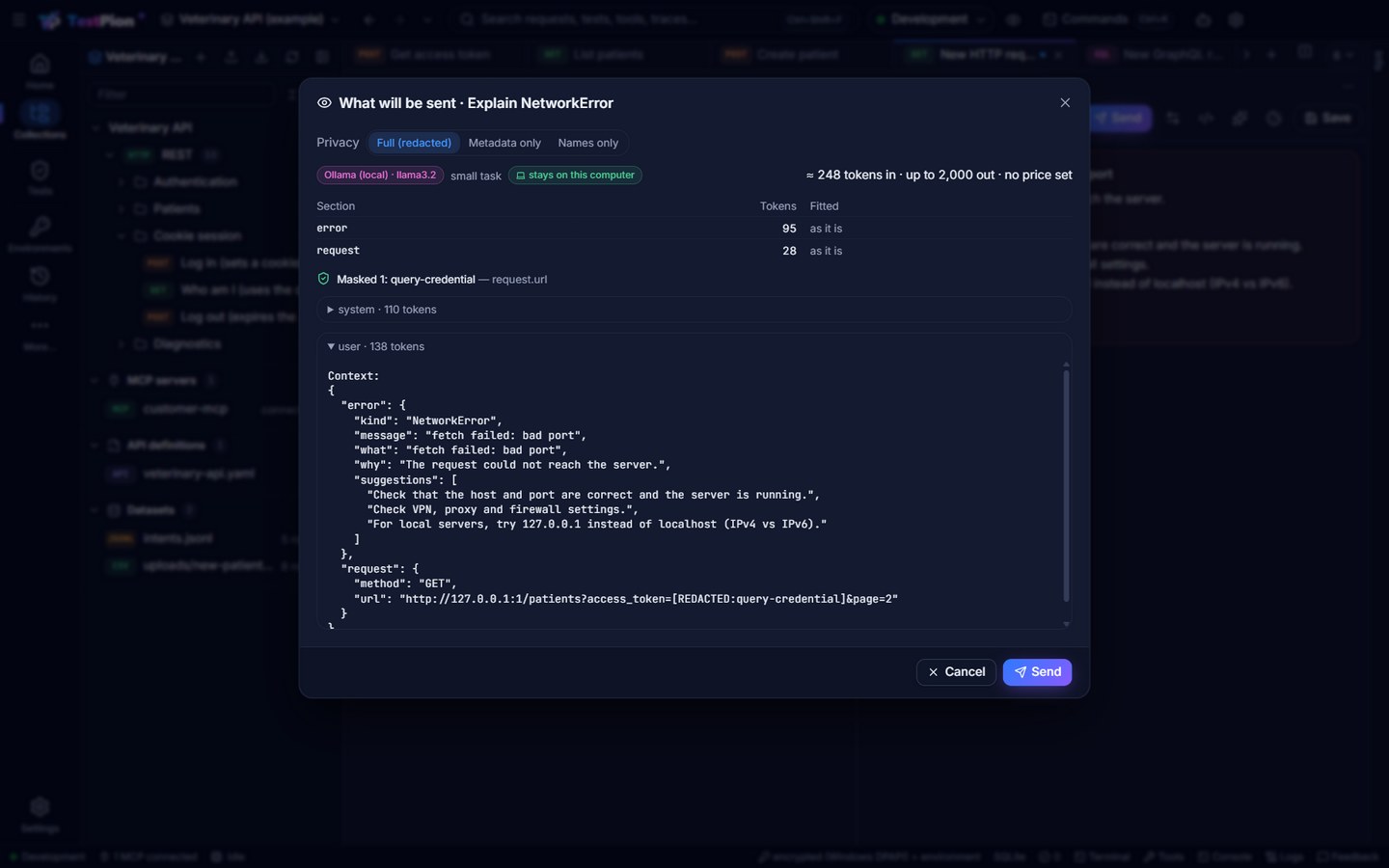
The eye beside every AI button — What will be sent… — and the same icon in the assistant's header show, before anything leaves the computer:
- the model, whether it is a small or large task, and whether it stays on this computer (else sent to the provider);
- the privacy level, which you can switch there;
- each section of the context with its tokens, and how a large one was fitted (sampled 20 of 340 items (first, last, failed, one of each shape), shortened long texts);
- what was masked, and where;
- the token and cost estimate (the price comes from Settings ▸ Model pricing; without one it says no price set);
- the exact messages.
Send goes ahead with the chosen level; Cancel sends nothing.
From the terminal: --dry-run on testpion ai run and testpion flow generate prints the same and sends nothing. For agents: dryRun: true on ai_run_task and flow_generate.
Privacy levels
| Level | What is sent |
|---|---|
| Full (redacted) (default) | Requests, responses and results, with secrets, tokens and personal data masked. |
| Metadata only | Methods, URLs without query values, statuses, names, and the shape of bodies ({ id: number, items: [ {…} ×20 ] }) — no body values. |
| Names only | Names, kinds and the structure; no URLs, bodies or values. |
The default is Settings ▸ AI assistant ▸ What is sent by default; each action can change it (the dialog, --privacy full|metadata|names, privacy for agents).
Redaction
Always, at every level:
- Secret values: secret variables, keys the engine resolved, values of sensitive headers — wherever they appear.
- Sensitive field names:
password,authorization,token,apiKey,client_secret… (the list in Settings ▸ Privacy & security). - Credentials found by their shape in any field or text: JWTs,
Bearer/Basiccredentials, private keys, API keys of the big providers (OpenAI, Anthropic, AWS, Google, GitHub, Slack, Stripe, GitLab, npm, Hugging Face), and credential query parameters (?access_token=…,?api_key=…). - Personal data (on by default; Mask personal data turns it off): e-mail addresses, phone numbers, card numbers (Luhn-checked) and IBANs (checksum-checked).
Variable names may be sent, so a generated request or flow can use {{baseUrl}}; their values never are. JSON is never cut mid-value: a large context is sampled and summarised to its shape instead.
Proposals: review, accept, undo
A task that generates something — checks, tp tests, a flow, a test file, a request — returns a proposal: its items, each with its diff and the badges of the verification the engine did before you see it. Generating actions open the review by themselves.
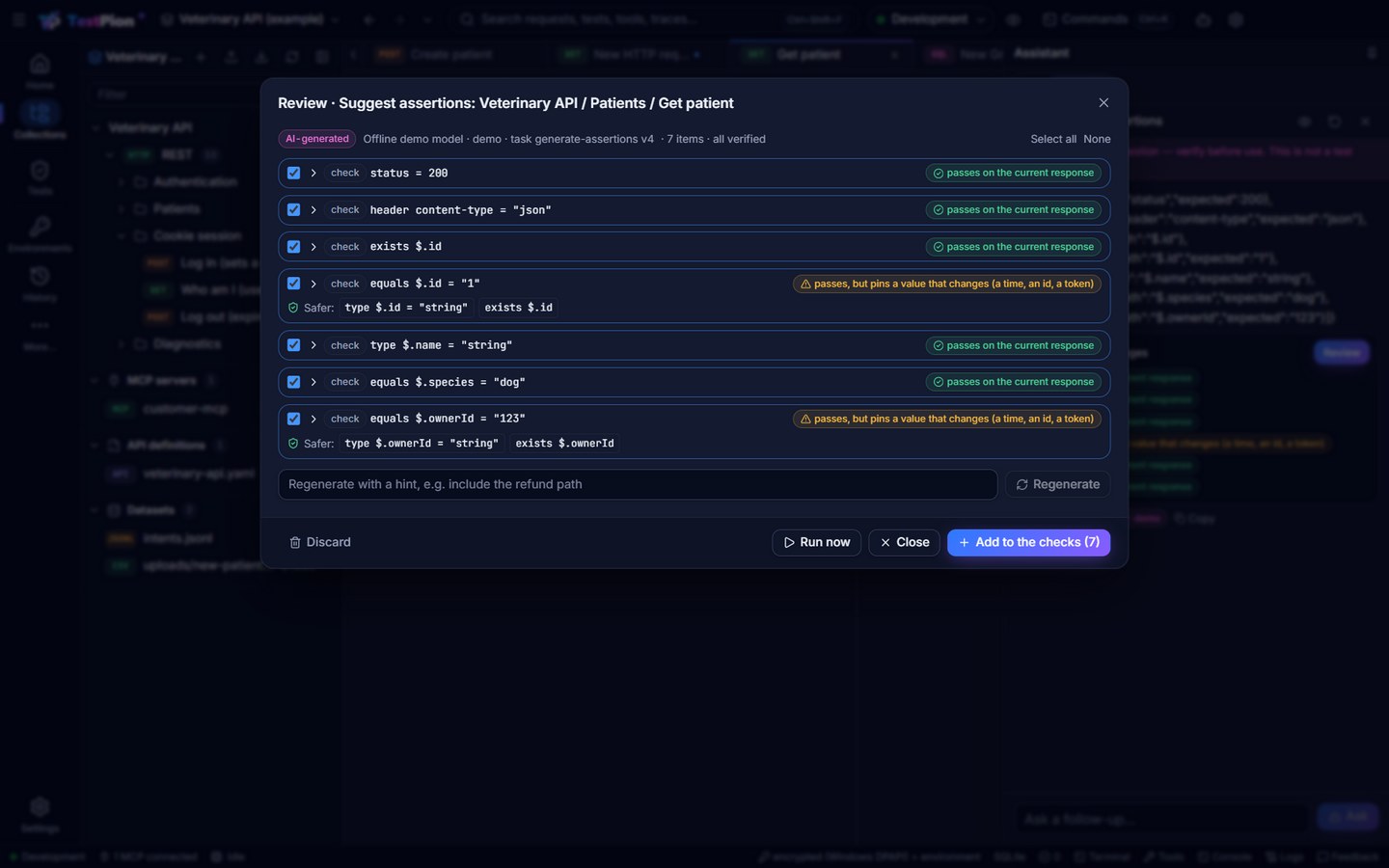
In the review:
- An analysis (a failed run, a flaky test) shows its findings first — each cause or pattern with its kind, confidence and evidence, the facts linking the run or result they are about — and the fixes below them; what TestPion changed in the model's answer is listed as notes under the summary.
- Tick the items to apply; an item that failed its verification starts unticked, with the problem said — never hidden. Select all / None. A text item (a bug report, what to do) has Copy.
- Open an item for its diff and the verifiers' details.
- Safer: on a check that pins a value that changes (an id, a time, a token) offers stable forms —
type,exists, a formatregex— and checks the one you pick again. - Run now (checks and tests of a request) sends the request again, the usual way and under the production guard, and checks every item against the new response and the one before it.
- Try on mock (a flow) runs it against a mock built from the collection's saved examples.
- Regenerate asks again with a hint (also test pagination); Discard drops the proposal.
- Accept selected (Ctrl+Enter) — the button names what it does: Add to the checks (the request's Tests tab), Add to the Post-response script (added after your own script, never replacing it), Open as a new request, Apply selected fixes (a failed run), Keep the fix (after Attempt to fix). Changes made in the request editor are saved when you save the request; files are written at once, and the message offers Undo.
A flow is reviewed on a canvas preview instead, marked AI-generated, with its YAML (edit it there: Check again verifies the edit) — see Let AI write the flow.
Accepting writes through the workspace's own writers (test files, the saved request's checks or script, a new request). Proposals are kept for a day in the workspace's .local/ai/proposals/ (git-ignored, this computer only), so a proposal made in the app can be applied from the CLI (testpion ai apply <id>) or by an agent (ai_apply_proposal), and the other way round.
Verification
Before a proposal is shown, its items are checked:
| Verifier | What it checks |
|---|---|
checks | Each suggested check runs against the response it was written for and the one before it (the saved request's History): a check that passes now but failed before is unticked (the value changes); one that pins a generated value (a time, an id, a token) is flagged. Both offer safer forms. Without a stored response the item says no response to check against. |
script | Each tp test runs in the sandbox against the response (no network), and against the previous one: 1/1 tests pass on the current and the previous response. pm.* / postman.* fails (TestPion writes tp.*) and is sent back to be rewritten. |
test-file | The test loader reads the file and the lint (keys, check types, dependsOn, cycles) finds no error. |
flow-refs | Every {{variable}} a flow uses is extracted by an earlier step or is a known variable name. |
flow-vars | (Flows from a collection.) Every {{variable}} is extracted by a step the step waits for (dependsOn, directly or through others), or is one your workspace has. |
flow-mock | The flow runs against a mock server built from the collection's saved examples, every step pointed at the mock (no real server is called; auth and requests sent by scripts are left out). A collection without saved examples is not tried (no mock). |
json / yaml | Generated JSON / YAML parses (and matches the tool's input schema, for MCP arguments). |
fix | (Triage and flaky analysis.) A changed check passes on the failing response, never on any response, and is compared with the last passing one; a patched test file lints; an edited script passes in the sandbox; a variable is one the failing steps missed and never a secret; a bug report shows what changed since the last pass (triage). |
Repairs. A model's answer is structured output: JSON that must match the task's schema (the provider's JSON-schema mode where it has one). An answer that does not parse, does not match, or fails a verifier is sent back with the problem — up to twice. If it is still wrong you see the best attempt with the failing items unticked and Still wrong after the repairs. An answer cut at the output limit is not used: it says so instead.
YAML made safe. A value that starts with {{ but is not quoted (url: {{baseUrl}}/pets, a YAML error models often make) is quoted before the file is checked, and the review says Fixed N unquoted template values. A YAML error that remains goes back with its likely cause in plain words (an unquoted {{, a tab, bad indentation, a key written twice).
The format, from the source. The flow and test prompts carry a compact reference of the test-file format made from the same schema and check registry the lint uses (the step keys, each check with an example, one complete flow), so the model is told exactly what the runner accepts; a check written in the wrong shape goes back with the right shape.
The script API, from the sandbox. Generate tests (and a triage that edits a script) carry the tp.* reference read from the script sandbox itself: what tp, tp.response, tp.response.to and a tp.expect(…) chain really have — methods, values, assertion flags and chain words — with one test that runs. A generated script that uses anything else is sent back with what to write instead, for example tp.response.body is the response text (a string), so tp.response.body.id is undefined: read a field with tp.response.json().id, pm.response.json() is Postman's name: TestPion scripts use tp.response.json(), toBeTruthy() is Jest style; TestPion scripts use chai style: tp.expect(value).to.be.ok, or did you mean status()? for an invented statusCode().
Explain and fix failures (triage)
Explain and fix failures with AI… is on every failed run: the run's ⋯ menu (tests, a collection run, a flow run, a monitor's run), a run's right-click menu in Runs, and the failed run in the Problems panel and Home's Needs attention (its ⋯ or right-click).
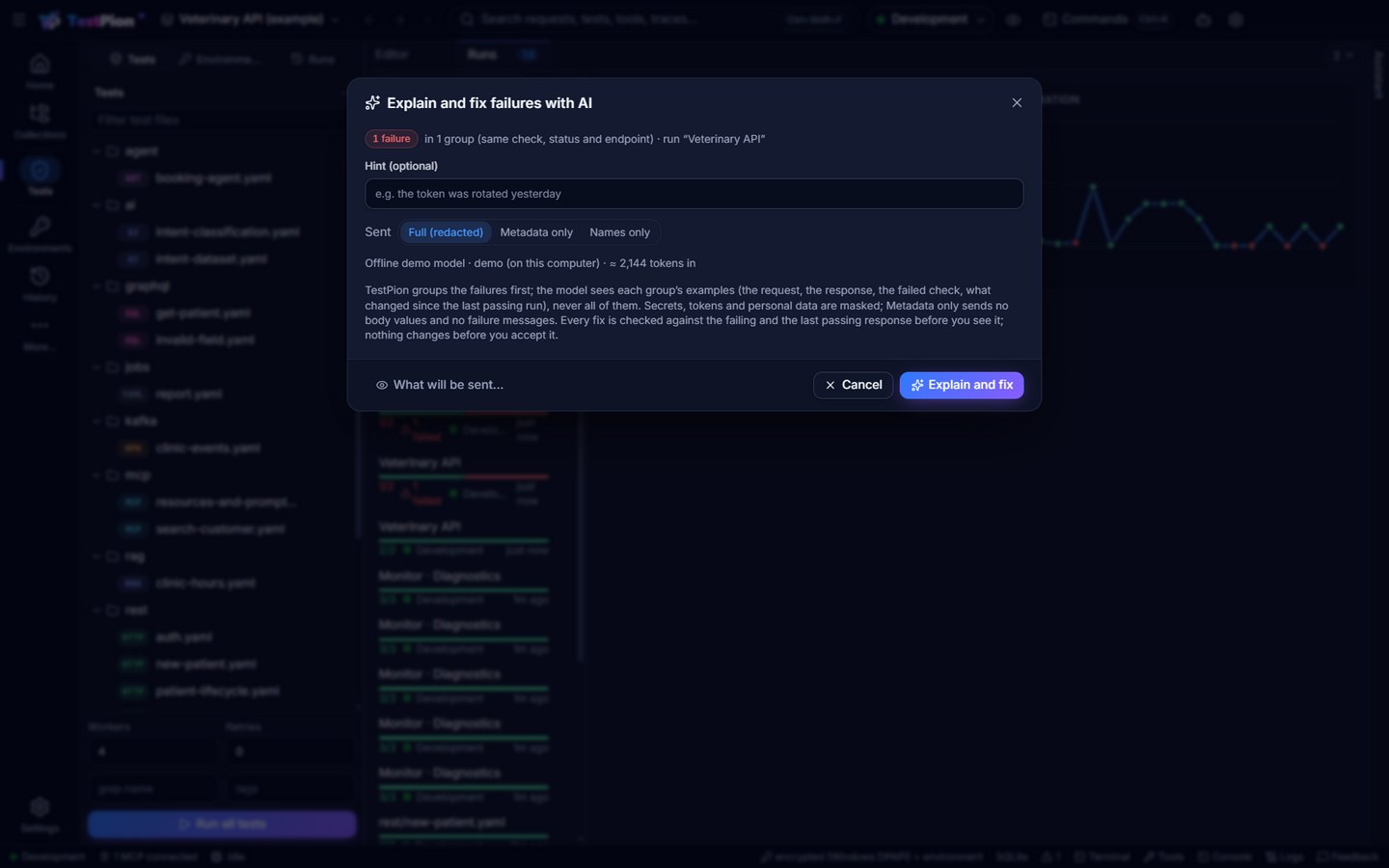
- TestPion groups the failures first, without AI: the same failed check (or error kind), the same status and the same endpoint (host and path, ids as
{id}) are one group. A run with 500 failures from one expired token is a handful of groups, not 500 items. Before anything is sent the dialog says how many failures and groups there are, the model and the token estimate (and the most it may cost, when the model has a price), with What will be sent…, the privacy level and a hint (the token was rotated yesterday). - The model sees each group's examples (two per group; up to 40 groups, the rest are counted, not sent): the failing step and where it is defined, the request, the status, the failed checks (expected and actual), the checks as the test writes them, the response's headers and body, unresolved variables — and the same test's last passing run: when it passed and what changed since (the status, the headers, the body's fields). It answers with causes: one cause may explain many groups (the token expired behind 401s on four endpoints), each with its kind (API regression, test is stale, auth, environment, test data, flaky, timing), its evidence, a confidence and a fix.
- Every fix is verified before you see it, then reviewed in the same proposal review, the causes and their evidence above the fixes (each fact links the result or the run it is about):
| Fix | What it changes | How it is verified |
|---|---|---|
| A check | One check of the saved request, or of the test file's step (shown as a diff; the file's comments stay) | The new check must pass on the failing response and must not pass on any response (an empty body, an error page: accepts any response is refused); it is run on the last passing response too: a check that would have failed there follows an API change — accept it only if the change is intended. |
| An edit | Exact text of the test file or the request's test script, replaced | The file lints; an edited script's tests pass in the sandbox on the failing response. |
| A variable | A variable of the run's environment the failing steps could not resolve | It must be one the steps missed; a value that looks like a secret is refused (set it yourself: TestPion never takes a credential from a model). |
| None | Nothing: the test is right | When the API regressed: a bug report to copy (Copy on the item: the request, what was expected, the status, when it last passed and what changed — credentials masked), verified by the change since the last pass. Otherwise what to do (renew the token, start the server). |
The model names a failing check by its result and its place in the test (checkIndex, as the evidence numbers them), so a check fix cannot miss its check. For a stale expected value TestPion works out the update itself (the value the failing response has now, or a stable form when the server makes the value up — an id, a time, a token; never for a 5xx, 401 or 403, and not when the check failed on the last passing run too): it stands in when the model's fix cannot be made (marked TestPion: the value the API answers now), and when the model proposed something else whose verification is not a clean pass it is offered beside it under Safer: (TestPion: type $.id = "string"; a click puts it in and checks it again). A fix that fails its verification, or cannot be made at all (the text to change is not in "Health"), goes back to the model with the reason and the checks it may name (up to twice), then stays unticked with the reason. What TestPion changed in the model's answer is listed under the summary (notes).
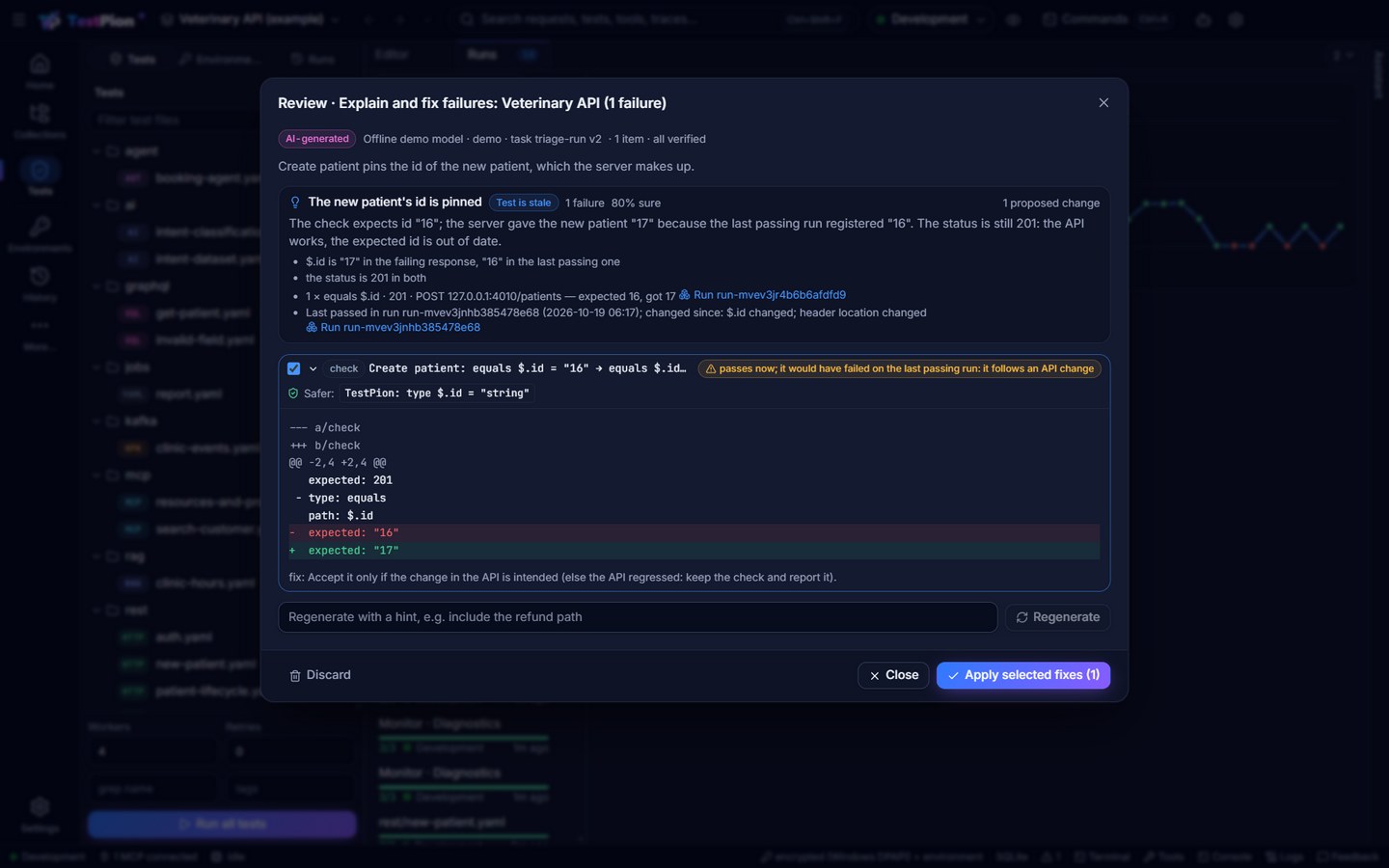
Nothing changes before you apply it. Untick what you don't want, then Apply selected fixes: the dialog offers Rerun the affected tests (the failed results of the causes you fixed, as Run again runs them) and Undo. A file or saved request that changed after the triage is not overwritten (it changed since the proposal was made: run the triage again). Regenerate asks again with a hint; Discard drops the proposal.
Privacy. Failure bodies are the main risk: they are masked like every context (secret values, tokens, keys and personal data found by their shape). Metadata only sends the run's counts; for each group its size (its label and likely cause go as string (N chars)); for each example the request method and URL (query values replaced by …), the status, the failed checks' types and names, the checks as your test writes them (with their expected values), header names (values …, except Content-Type), the body as a shape (field names and types, a text as string (N chars)) and the names of unresolved variables; and of the last passing run its status, which headers changed (name and kind, when both runs stored headers) and the body's changes as shapes only: how many fields changed, each change's path and kind sent as string (N chars) — not which fields, not their values. No body values and no failure messages (they quote the body). Names only sends less still: the URL's path only, and expected values and most numbers as their type. What will be sent… shows the exact messages first.
Without a model (none set up, or --no-ai / noAi) you still get TestPion's grouping with the likely cause of each group: 401/403 → auth; an unresolved variable, a network error or a 502–504 → environment; a result that keeps flipping → flaky; a failed time limit → timing; another 5xx → the API; a check that held on the last pass and fails now → the test expects what the API no longer answers (the API regressed or the test is stale).
Triage from the terminal and CI
These examples ran in a scratch copy of the examples workspace against the local demo server (node examples/servers/demo-servers.mjs), with the workspace's offline mock model (TESTPION_AI_PROVIDER=offline TESTPION_AI_MODEL=mock) given a scripted answer — your model writes its own. List patients got one more check, { type: equals, path: $.total, expected: 2 }: it passed, then a test registered a patient, and the next run failed (ids shortened, report lines left out):
$ testpion run-collection "Veterinary API" -e Development --folder "Get access token" --folder "List patients" --triage
TestPion — Veterinary API
  ✓ Authentication / Get access token (68ms)
  ✗ Patients / List patients (3ms)
      ✗ equals $.total: expected 2, got 3 score=0

## Triage (AI)

1 failure of run run-mvckcrya (Veterinary API) in 1 group · causes by Offline mock/mock, review before applying.

One check pins the number of patients, which grows whenever a test registers one.

### The check pins the patient count

**test-data** · 1 failure · 85% sure · groups g1

List patients expects $.total to be 2. The last passing run had 2 patients; since then a patient was registered, so the API answers 3. The status is still 200 and the list is well-formed: the API works, the expected count is test data that changes.
- $.total is 3 in the failing response, 2 in the last passing one
- $.items[2] was added since the last pass
- 1 × equals $.total · 200 · GET 127.0.0.1:4010/patients — expected 2, got 3
- Last passed in run run-mvckc4vk (2026-10-17 15:40); changed since: $.items[2] added; $.total changed; headers not stored for the passing run
- **Proposed fix:** List patients: equals $.total = 2 → greater-than $.total = 0 (✓ passes on the failing response and on the last passing one)

Apply: `testpion ai apply ai-mvckcs7b` (the ticked items) · rerun the affected tests: `testpion run-collection veterinary-api --rerun-failed run-mvckcrya`
triage: runs/run-mvckcrya/triage.md

FAILED  1 passed, 1 failed, 0 errors, 0 skipped · 185 ms
--triage (on test, run and run-collection) runs after a run with failures. It writes triage.md and triage.json beside the results and adds a Triage (AI) section to the JUnit (the suite's <system-out>), HTML and Markdown reports — only when a model answered. It never changes the exit code (here 1: the run failed; a triage that fails is a warning). Without a model it prints the grouping (grouped by TestPion (no model)):
$ testpion ai triage --no-ai
## Triage

1 failure of run run-mvckcrya (Veterinary API) in 1 group · grouped by TestPion (no model).

_Made without AI (as asked): TestPion grouped the failures and named the likely causes._

### The test expects what the API no longer answers: equals $.total · 200 · GET 127.0.0.1:4010/patients

**stale-test** · 1 failure · groups g1

The response changed since the last passing run ($.items[2] added; $.total changed; headers not stored for the passing run): either the API regressed or the test is stale.
- 1 × equals $.total · 200 · GET 127.0.0.1:4010/patients — expected 2, got 3
- Last passed in run run-mvckc4vk (2026-10-17 15:40); changed since: $.items[2] added; $.total changed; headers not stored for the passing run

$ testpion ai triage --privacy metadata --dry-run
…the grouping, then:
What will be sent — Explain and fix failures
  model     Offline mock / mock (large task, from env) · stays on this computer
  privacy   metadata
  estimate  ≈ 2,189 tokens in, up to 4,000 out · no price for this model (Settings ▸ Model pricing)
  section   run: 41 tokens
  section   groups: 552 tokens
…the exact system and user messages, then:
Nothing was sent (--dry-run).

$ testpion ai triage --apply
…the triage, as above, then:
Proposal ai-mvckd5n1 · 1 item · Offline mock/mock · AI-generated, review before applying
  One check pins the number of patients, which grows whenever a test registers one.
  [x] i1  List patients: equals $.total = 2 → greater-than $.total = 0
        ✓ passes on the failing response and on the last passing one
Offline mock/mock · 2,754 in / 180 out

Applied 1 fix · rerun the affected tests: testpion run-collection veterinary-api --rerun-failed run-mvckcrya · undo: testpion ai undo ai-mvckd5n1

$ testpion run-collection "Veterinary API" -e Development --folder "Get access token" --folder "List patients"
  ✓ Authentication / Get access token (67ms)
  ✓ Patients / List patients (3ms)

PASSED  2 passed, 0 failed, 0 errors, 0 skipped · 174 ms
The suggested --rerun-failed runs the failed requests and, first, the earlier requests they need: here List patients uses the token Get access token's script sets, so Get access token runs too, marked [setup]. A setup request's result is reported (its failure too) but does not count toward the rerun's totals. Rerun the affected tests and Rerun failed in the app do the same.
testpion ai triage --run <id|last> (last, the default: the newest finished run with failures; a stopped run or one still going is passed by) takes --privacy full|metadata|names, --hint, --provider / --model, --no-ai, --dry-run, --apply [--items i1,i3] and --json ({ runId, run, failures, groups, omitted, findings, ai, model, summary, proposal, usage, repairs, problems }; fallback says why there is no AI answer; plus applied and rerun after --apply). Without a model it exits 0 with the grouping. The same task runs as testpion ai run triage-run --item run:<id> (that one needs a model). Agents: ai_triage_run, then ai_apply_proposal.
Why is this flaky?
A test is flaky when it passes and fails without a change (the Problems panel, testpion problems and flaky_tests list them: a result that flipped at least twice, or passed only after a retry). Why is this flaky? — on the flaky test in the Problems panel (its ⋯ or right-click), or in a result's History tab when it flipped — reads the test's results across runs and gathers the signals without a model: how often it passed, how often the result flipped, retries, the environments it failed in, its time when it passes and when it fails, the statuses and checks of its failures, the hours they happened, and a failing and a passing response. TestPion also computes the signature — how the failing responses differ from passing ones, e.g. $.status: "done" when it passes, "running" when it fails (the fields the failing checks assert first, then state fields such as status, phase or ready; ids, times, tokens and counters are left out unless a check asserts them) — and the pattern it points to (an intermediate state → timing; 429 → rate limit; 409 → data collision; changed dates → time-dependent; 5xx, timeouts, failures much slower than passes or failures in one environment only → external dependency). The model names the pattern — timing, ordering, shared state, time-dependent (a date, an expiry), external dependency, rate limit, data collision — with evidence and a confidence, and proposes a fix that makes the test stable without hiding a failure:
- a wait for an eventual result (
until:on the step), or a timeout for a slow call; - a stable check (a type, a format, a generous time limit) instead of a value that changes, verified on the failing and the passing response;
- isolated data (a unique name with
{{$guid}}) as an edit of the test; - a retry only as a last resort (at most 2), always flagged a retry: the failure can still come back, and a real one is retried too.
Skipping, disabling or quarantining the test is never offered: a fix that sets skip, tags, if or the like is dropped with Not offered: … would hide the test's failures. A fix that breaks the YAML or cannot be made goes back to the model with the lint's explanation or the check to name (up to twice).
Attempt to fix applies the ticked fix and runs the test again 5 times through the ordinary runner (its whole file, in the environment of its runs; in an environment marked as production its data-changing requests ask first, as any run); the review shows the verdict — Stable passed 5/5, Still flaky or Failing (with the first failure) — kept with the proposal. Keep the fix, Run 5 times again, or Undo in the message puts the test back.
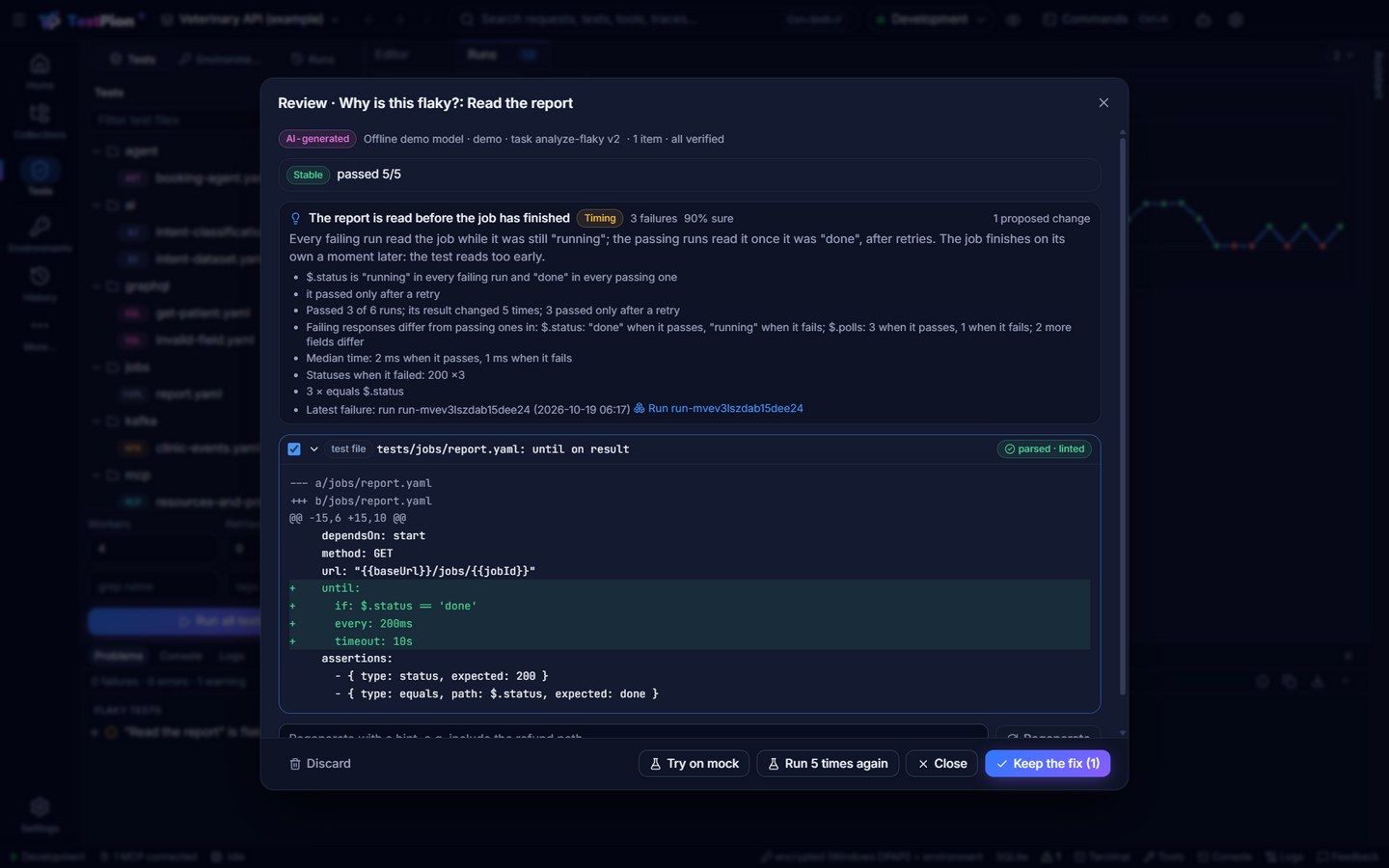
From the terminal, in the same scratch workspace: a file tests/jobs/report.yaml starts a job (POST /jobs) and reads it back (GET /jobs/{{jobId}}, equals $.status done); the demo server says running twice, then done. It failed when run alone and passed with --retries 2, three times each:
$ testpion ai run analyze-flaky --item test:jobs/report.yaml
Offline mock/mock · 3,216 in / 133 out · AI-generated

Proposal ai-mvckdy5v · 1 item · Offline mock/mock · AI-generated, review before applying
  The report is read before the job has finished · timing · 3 failures · 90% sure
    Every failing run read the job while it was still "running"; the passing runs read it once it was "done" (after retries). The job finishes on its own a moment later: the test reads too early.
    - $.status is "running" in every failing run and "done" in every passing one
    - it passed only after a retry
    - Passed 3 of 6 runs; its result changed 5 times; 3 passed only after a retry
    - Failing responses differ from passing ones in: $.id: "job-6" when it passes, "job-5" when it fails; $.status: "done" when it passes, "running" when it fails; $.polls: 3 when it passes, 1 when it fails; 1 more field differ
    - Median time: 4 ms when it passes, 3 ms when it fails
  [x] i1  tests/jobs/report.yaml: until on result
        ✓ parsed · linted

Apply: testpion ai apply ai-mvckdy5v · discard: testpion ai discard ai-mvckdy5v

$ testpion ai attempt-fix ai-mvckdy5v
Stable: passed 5/5
The step now waits for the job:
  - id: result
    name: Read the report
    dependsOn: start
    method: GET
    url: "{{baseUrl}}/jobs/{{jobId}}"
    until:
      if: $.status == 'done'
      every: 200ms
      timeout: 10s
--item is test:<path>[:<step>] (without a step: the file's flaky step) or test-case:<testId> (as flaky_tests names it). testpion ai attempt-fix <id> [--times 5] [--items i1] [--json] runs it 1–20 times; it exits 0 whatever the verdict (read it from --json: attempt.verdict is stable, flaky or failing) and testpion ai undo <id> puts the test back. In an environment marked as production its data-changing requests need --allow-production. Agents: ai_analyze_flaky, then ai_attempt_fix (it changes the test and sends its requests, so it asks the user first, and refuses a production environment unless the MCP server was started with --allow-production).
Privacy and no model. The flaky analysis sends the test's history (statuses, times, environments, the failed checks), a failing and a passing response, masked like every context; at Metadata only the signature (it quotes body values) and the failure messages are left out. Without a model, the dialog and ai_analyze_flaky (noAi: true) show the signals, the signature and the likely pattern; so does testpion ai run analyze-flaky (with --no-ai, or when no model is set up: note: no model configured, exit code 0).
Cost: estimates, caps and usage
- Before sending: the estimate in What will be sent…, in the flow dialog and on hover over an AI button (≈ tokens in, the most the answer may cost).
- Caps: Settings ▸ AI assistant ▸ Limits — Tokens per call, Tokens per day and Cost per day ($), per workspace; empty is no cap. A call over a cap is refused with Over an AI limit … Nothing was sent. and Change the limits. The CLI, MCP and CI calls count and are capped too.
- AI Lab ▸ Usage ▸ AI features: calls, tokens and cost today and over 30 days, what is left of the daily caps, tokens per task, calls per model and per surface (App, CLI, MCP agents, CI), and the latest calls with their outcome (ok, accepted, discarded, error). The AI Lab's own prompts follow below it.
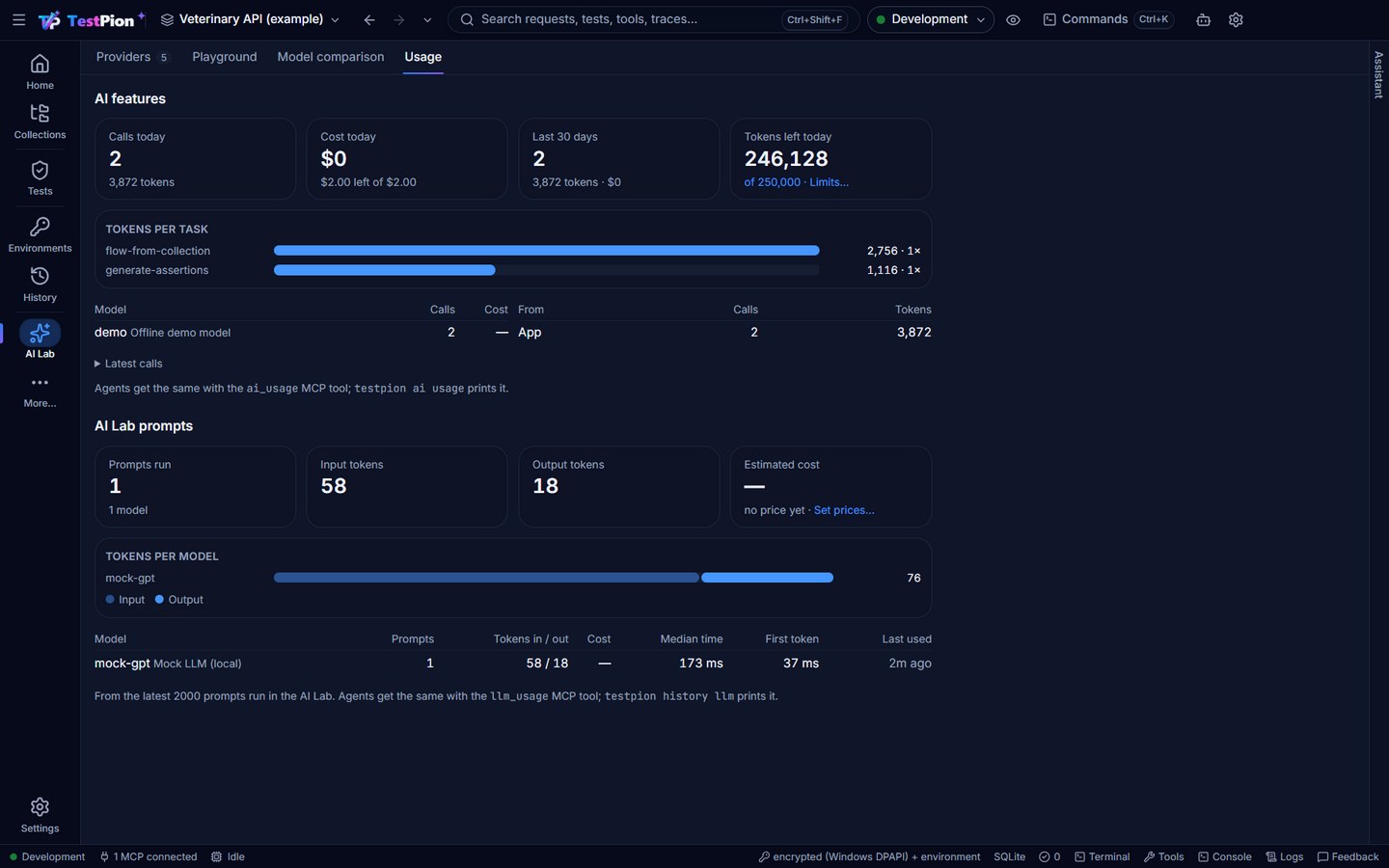
Terminal: testpion ai usage [--days 7] [--json]; agents: ai_usage.
From the terminal, agents and CI
The examples below are run in the examples workspace (collection Veterinary API). Every command takes --json (the JSON envelope) and -w <workspace>.
testpion ai tasks                                            # the 29 tasks: id, title, tier, whether it proposes
TESTPION_AI_PROVIDER=ollama testpion ai run explain-error --context @error.json --dry-run   # what would be sent
testpion ai run explain-test-failure --item run:<runId>:<resultId>   # an answer, streamed
testpion ai run explain-test-failure --item run:last                 # the newest finished run (as ci --run last)
testpion ai run suggest-assertions --item request:veterinary-api:req-get --json            # a proposal of verified checks
testpion flow generate --collection "Veterinary API" --folder Patients --dry-run           # the flow: what would be sent
testpion flow generate --collection "Veterinary API" --folder Patients                     # the flow, verified, proposed
testpion ai proposals                                        # the workspace's proposals (a day)
testpion ai apply ai-mvbu2qjg9a3b644187                      # write the ticked items (--items i1,i3 to choose)
testpion ai undo ai-mvbu2qjg9a3b644187                       # put back what it replaced
testpion ai usage                                            # today, 30 days, per task and model, the caps
ai run and flow generate only propose; --apply applies at once (flow generate --apply only when its verification did not fail). suggest-assertions is the same task as generate-assertions, generate-tests the same as generate-pm-tests. ai run --item request:<c>:<r> checks the suggestions against the request's latest response in History. See ai and flow generate.
A dry run prints:
What will be sent — Explain an error
  model     Ollama / llama3.2 (small task, from env) · stays on this computer
  privacy   full
  estimate  ≈ 168 tokens in, up to 2,000 out · no price for this model (Settings ▸ Model pricing)
  section   error: 20 tokens
  section   request: 25 tokens
  masked    1: query-credential
For AI agents (MCP)
Agents are models themselves, so the deterministic tools come first. For clients that want TestPion's configured model: ai_list_tasks, ai_run_task (an answer and a proposal with an id; dryRun: true shows what would be sent), ai_proposals, ai_apply_proposal (a separate call that asks the user to confirm; dryRun: true lists what would be applied), ai_undo_proposal, ai_usage, flow_generate (an integration flow from a collection or folder, proposed; noAi: true for the draft without a model), ai_triage_run (a failed run's causes and verified fixes; noAi: true for the grouping alone), ai_analyze_flaky and ai_attempt_fix (it asks the user to confirm). See Use from AI agents.
In CI
A pipeline uses its own key (or a model on the runner) and is counted as CI in the usage:
# GitHub Actions: propose an integration flow for review in the pull request
- run: npx testpion@0.51.0 flow generate --collection "Veterinary API" --folder Patients --json > flow-proposal.json
  env:
    TESTPION_AI_PROVIDER: anthropic
    TESTPION_AI_MODEL_LARGE: claude-sonnet-5-5
    ANTHROPIC_API_KEY: ${{ secrets.ANTHROPIC_API_KEY }}
Without a model set up, flow generate (and flow_generate) returns TestPion's deterministic draft with a note instead of failing; --no-ai asks for it on purpose.
A failed test job can explain itself in its log and reports (triage); the exit code stays the run's:
- run: npx testpion@0.51.0 test tests/ --triage --reporter console junit html
  env:
    TESTPION_AI_PROVIDER: anthropic
    TESTPION_AI_MODEL_LARGE: claude-sonnet-5-5
    ANTHROPIC_API_KEY: ${{ secrets.ANTHROPIC_API_KEY }}
- uses: actions/upload-artifact@v4
  if: failure()
  with: { name: triage, path: runs/*/triage.md }
--triage sends at the default privacy level (Full (redacted) on a runner without a settings.json). To send Metadata only from a pipeline, run the triage as its own step after the tests: npx testpion@0.51.0 ai triage --run last --privacy metadata (it exits 0, so add if: failure() to run it only after a failed test step). Without a key the job still gets triage.md with TestPion's grouping.
The prompts are tested (for contributors)
Each task has a versioned prompt (packages/core/src/ai/tasks/; a change to a prompt is a new version) and golden cases in tests/ai/, run with the mock provider in every npm test: the answer's shape, the verifiers, the repair loop, truncation, privacy levels, redaction (no secret reaches the provider) and proposal safety (paths stay under tests/). The mock answers with scripted rules: a regular expression on the last user message and the answer, or responses answered in turn to test a repair:
import { harness } from './harness.js';
const h = harness({ rules: [{ match: '"source"', responses: ['not json', JSON.stringify(flow)] }] });
AI_EVAL_LIVE=1 runs the same cases against a real model and prints a scorecard per task; it is never run in CI by default and needs your own model:
AI_EVAL_LIVE=1 TESTPION_AI_PROVIDER=ollama TESTPION_AI_MODEL=llama3.2 npx vitest run tests/aiTroubleshooting
| You see | Why, and what to do |
|---|---|
| The AI assistant is off with Set up AI | No model is chosen: Settings ▸ AI assistant. CLI: --provider / --model or TESTPION_AI_PROVIDER / TESTPION_AI_MODEL. |
| No API key for … with Add the key | The provider needs its key: AI Lab ▸ Providers ▸ the provider ▸ API key. CLI/CI: TESTPION_SECRET_PROVIDER_<ID>_APIKEY. |
| No model name given for provider … | The provider has no default model: set one in AI Lab ▸ Providers, or pass --model / TESTPION_AI_MODEL. |
| Local only is on: … would send the context off this computer | Choose a model on this computer, or turn Local only off (unset TESTPION_AI_LOCAL_ONLY). It comes before No API key for …: a keyless cloud provider is refused for leaving the computer. |
| Over an AI limit with Change the limits | A per-call or per-day cap; nothing was sent. AI Lab ▸ Usage shows what is left today. |
| Could not reach Ollama at http://127.0.0.1:11434/… | The local model's server is not running (start Ollama, or LM Studio's server). |
| An item unticked with fails on the current response or the value changes | Its check does not hold; pick a Safer form, or Run now after fixing the request. |
| Still wrong after the repairs | The model could not fix its answer in two turns: Regenerate with a hint, choose a larger model for large tasks, or use a smaller folder. |
| 0/3 steps pass on a mock (a warning) | The mock answers only with saved examples: a step whose request has none gets a 404. Save as example on its response, then Try on mock. |
| The answer was cut at the output limit | Ask a narrower question (or a smaller folder), or allow more output (testpion ai run … --max-tokens). |
| No finished run has failures / Run … has no failures to triage | ai triage (and --run last) takes the newest finished run with failed or errored results; a cancelled run or one still going is passed by. testpion history lists the runs; pass --run <id>. |
--triage printed no Triage section | The run passed, was cancelled, or ran a collection file outside a workspace (such a run is not recorded, so it is not triaged): run it in a workspace, or testpion ai triage --run <id> afterwards. |
| TestPion can't find where these tests are defined, so the fix is not offered | The run does not say what it ran (a run of an older version, a collection file): the cause is still explained. Run it again from the workspace for fixes. |
| it changed since the proposal was made | The test file or saved request was edited after the triage or flaky analysis: run it again, so the fix is made from what is there now. |
Nothing applied: no fix was ticked (ai triage --apply) | Every fix failed its verification (or there were none): read the review, then testpion ai apply <id> --items i1 for one you want anyway. |
The suggested --rerun-failed fails with 401 or 403 | The rerun adds the earlier requests whose scripts set a {{variable}} the failed ones use ([setup]). A token set some other way (a collection or folder script, a value set by hand) is not found: run that request with them (--folder), give the value (--env-var), or run the whole collection. |
| Not offered: … would hide the test's failures | The flaky analysis proposed skipping, quarantining or disabling the test, which TestPion never offers. Regenerate with a hint, or fix the cause by hand. |
| … is a production environment; the MCP server does not send to production | ai_attempt_fix in an environment marked as production: start testpion mcp-server --allow-production, or attempt the fix in the app (it asks). |
| "…" can't be run again: its test file or request is gone | Attempt to fix needs the flaky test's file or saved request: it was moved or deleted after the runs. |