
Privacy
Redaction
Everything written to logs, traces, history, results, reports and exports passes through a redactor that masks:
- Sensitive field names:
password,token,apiKey,authorization,cookie,secret,ssn,creditCardand more. These are configurable in Settings and matched case-insensitively, including as suffixes (accessToken,x-api-key). - Known secret values: every secret resolved during a run is registered, and any occurrence inside any string is masked (URLs, bodies, error messages). Tokens obtained at runtime (OAuth,
extract:into sensitive names) are registered too.
Exports
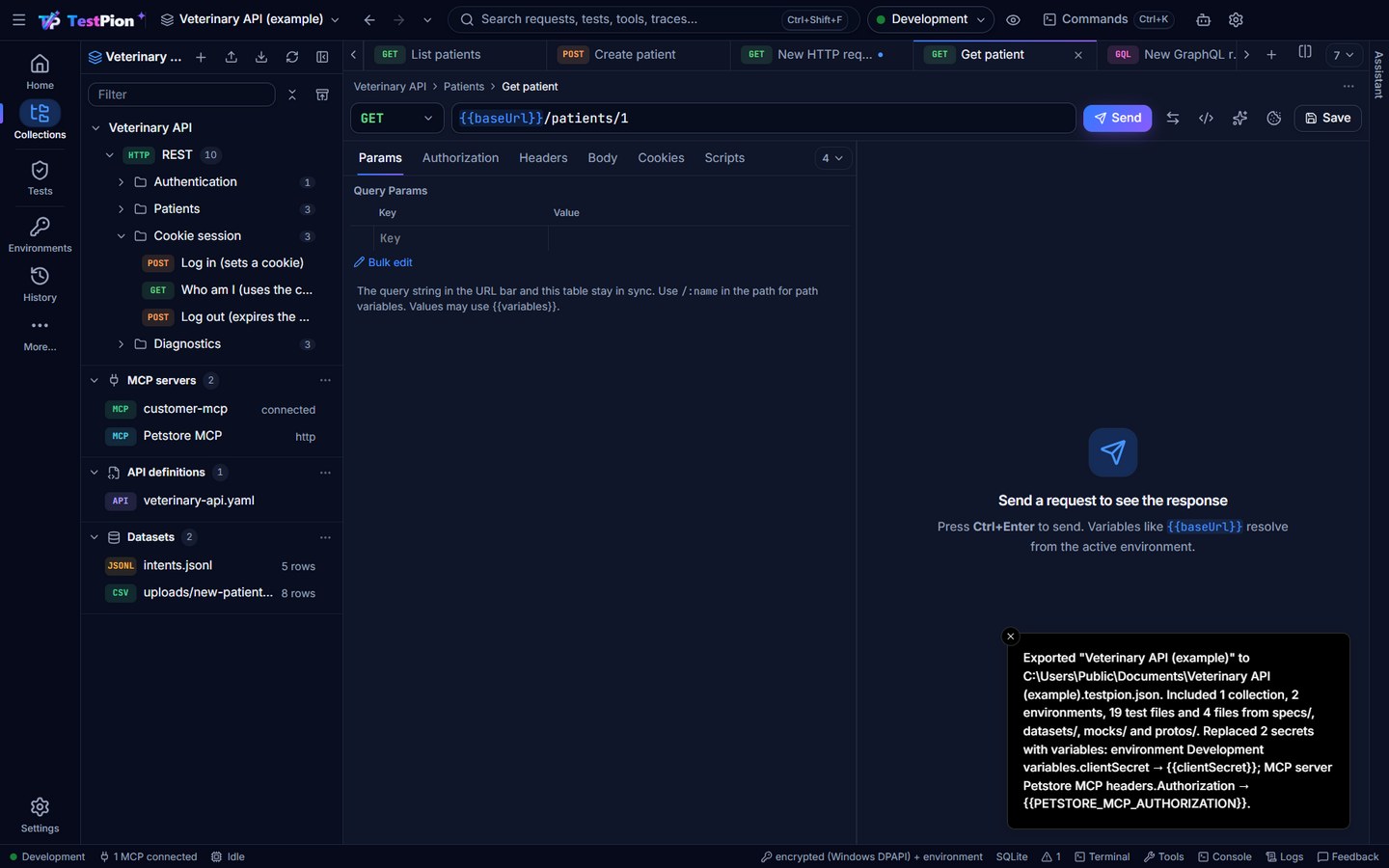
A workspace export (<name>.testpion.json, Export ▸ Workspace… or testpion workspace export) is meant to be shared, so it never contains a secret value:
- Contains: collections, environments, workspace variables, test files, saved items, MCP servers, providers, script packages, and the files of
specs/,datasets/,mocks/andprotos/(up to 10 MB each, 50 MB in all; a file left out is named in the message). - Never contains: the values of secret variables (exported empty), anything in the OS secret store, run results, history, traces, cookies,
.local/(trusted commands, current values) and Recently deleted. - Replaced by
{{variables}}: a value typed in where a secret belongs, found by one detector shared withtestpion git checkand the masks above. It looks at the name (password,Authorization,X-API-Key,client_secretand your redact fields) and at the shape of the value, each with a confidence: private key blocks, JWTs,Bearer/Basiccredentials, provider keys (sk-…,ghp_…,github_pat_…,glpat-…,xoxb-…,AKIA…,AIza…,SG.…,npm_…,pypi-…, Stripe, Hugging Face, Twilio), passwords in connection strings (postgres://,mysql://,mongodb://,amqp://,redis://…) and credential query parameters. MCP servers are denied by default: every header and stdioenvvalue becomes a variable, except names that never hold a secret (Content-Type,Accept,User-Agent,NODE_ENV…). An environment or workspace variable with a secret name or value that is not marked secret is exported empty and marked secret. A{{variable}},{{$secret.…}}or$env.NAMEreference is never replaced. Request bodies are not changed. - Listed: the export says what it replaced (where, and the variable; never the value): the message in the app, the CLI output and
replaced: [{ kind, item, field, variable }]with--json. Importing the file lists the values needed, to set as secret variables.
Saved files
The down arrow on every response and result writes a file only where you choose it in the Save as dialog (or a browser download); nothing is uploaded. What the file holds depends on the output (Save and export results):
- Redacted, always: the console, the application log, run results and reports, request traces, the flow run timeline, data-run and matrix grids, the cURL tab and the HTTP Debugger's HAR. Their values are masked as they are recorded, by the redactor above (Authorization and cookie headers, tokens and API keys by their shape, credential query parameters, the values of secret variables), so the file cannot hold them and there is no Include secrets…. Copy gives the same masked text.
- Redacted by default: decoded JWTs, the terminal transcript and generated code with Show secrets on. They show a Redacted mark; ▾ ▸ Include secrets… keeps the secrets in that one file, after you confirm (Anyone with the file can use them).
- As received: a response body (and its headers, cookies, stream, events and history), GraphQL and gRPC responses, message logs and MCP tool results are your own data and are saved as they are. When one looks like it holds a credential (a bearer token, an
access_tokenfield, a secret variable's value) the message after saving says so, and an output of an environment marked as production says that too. - Nothing secret: timings, checks, load results, the evaluation matrix and Problems.
The backend applies these rules from one list of outputs, never from what the window asks: an output that is always redacted is saved masked even when asked otherwise. The folder you last used is remembered per workspace and kind of output in the app's own data folder, never in the workspace (so not in git). A file is written as <name>.part and renamed when complete, so a cancelled save leaves nothing behind.
AI features
TestPion's own AI features (explain, suggest checks, write tests or a flow, explain and fix a failed run, find out why a test is flaky) send a context only when you start one, only to the model you chose, and redacted more strictly than logs: besides the rules above, credentials found by their shape in any text (JWTs, Bearer / Basic credentials, private keys, provider API keys, ?access_token= and similar) and personal data (e-mail addresses, phone numbers, card numbers, IBANs) are masked. What will be sent… shows the exact messages first; Metadata only and Names only send less, and Local only refuses any model that is not on this computer. Variable names may be sent, values never. See AI features: privacy, cost and review.
Failed runs and flaky tests carry the most: Explain and fix failures with AI… (and --triage in CI) sends, for each group of failures, at most two failing examples — the request, the status, the failed checks, the checks as your test writes them, the response's headers and body, and what changed since the test last passed — after the same masking; it never sends all the failures, and up to 40 groups at most. Metadata only sends no body values and no failure messages (they quote the body): the request's method and URL (query values as …), statuses, check types and names, the checks as your test writes them, header names, the shape of the body (field names and types, a text as string (N chars)), which headers changed since the last pass, and the body's changes since then as shapes only (how many; each change's path and kind as string (N chars), so not which fields changed). Why is this flaky? sends the test's results across runs (statuses, times, environments, the failed checks) and one failing and one passing response, masked the same way; at Metadata only the failure messages and how the bodies differ are left out. A variable fix the model proposes is refused when it looks like a secret: TestPion never takes a credential from a model. See Explain and fix failures and Why is this flaky?.
OS environment variables
{{$env.NAME}} reads an environment variable of the computer. In the app it works only for the names you list in Settings ▸ Privacy & security ▸ OS environment variables requests may read (none by default): otherwise a collection shared with you through git, or one you import, could read {{$env.AWS_SECRET_ACCESS_KEY}} and send it to any URL the moment you run it. A request that reads a variable not on the list says so, with a link to the setting. The CLI reads all of them, as CI pipelines expect (the pipeline decides what is in the environment; see CI/CD).
Programs a workspace starts
An MCP server of the stdio kind is a program TestPion starts on your computer, with your permissions. Because a workspace can come from git, an import or a teammate, the first Connect to such a server shows the exact command line and asks: Run once, or Always for this workspace (remembered in the workspace's .local/trust.json, which is per computer and never committed). Mock and HTTP servers start nothing and never ask. The CLI and the MCP server for agents run what you invoke, like any command.
Script sandbox
Scripts run in QuickJS compiled to WebAssembly, a separate JavaScript engine with its own heap. There is no filesystem, network, process, require or host-realm access. CPU time (2 s by default) and memory (32 MB) are limited. Data crosses the boundary only as JSON.
Network policy (shared and hosted servers)
On your desktop TestPion can call anything, including localhost and your private network, because testing those APIs is the point. When TestPion runs for other people, such as an MCP server that agents use or the planned online version, turn on the network policy:
- Private networks blocked: requests, redirects,
tp.sendRequest, GraphQL, WebSocket handshakes, MCP servers over HTTP, AI providers and remote datasets refuse loopback, private (10/8, 172.16/12, 192.168/16, fc00::/7), link-local (including the cloud metadata address 169.254.169.254), carrier-grade NAT and similar addresses. Host names are checked after DNS resolution and again when the connection opens, and every redirect is checked, so a public URL can't redirect or re-resolve into your network. - Local programs blocked: MCP servers that run as local commands (stdio) can't be started.
- Allow list: specific internal hosts can stay reachable.
Turn it on with environment variables (TESTPION_BLOCK_PRIVATE_NETWORKS=1, TESTPION_ALLOW_HOSTS=api.internal,10.0.0.5, TESTPION_ALLOW_PROCESSES=0) or with testpion mcp-server --block-private-networks [--allow-host api.internal].
Telemetry
Telemetry is not implemented. Request bodies, API keys, prompts and responses are sent only to the endpoints and providers you call.