
gRPC
The gRPC editor calls any gRPC service described by .proto files, or by the server itself through server reflection. Open it from the Collections explorer (a saved call, or + ▸ gRPC request); it shares the tab bar with the other request editors.
- On Proto files, add the service's
.protofile and the files it imports. Imports are matched by path, so give each file the path its import statement uses, such asvet/v1/common.proto(rename a file by editing its path). Google's well-known types (google/protobuf/timestamp.proto…) are built in. - Enter the server address,
host:port(plaintext) orgrpcs://host:port(TLS), and pick a method. Methods are listed aspackage.Service/Methodwith their kind (unary, server stream, client stream, bidi stream). - Write the request message as JSON, or click Example for a message with every field. For client-streaming and bidirectional methods, write a JSON list: one item per message sent.
- Add Metadata (headers such as
authorization) if the service needs it, then click Invoke.
The response shows the gRPC status (0 OK, 5 NOT_FOUND …) with its details, the time, the response message as a tree, the response Metadata and Trailers.
On an environment marked as production, a call that is not a read by its method name (Get…, List…, Search…, Watch…, Check…, health checks and the like are reads) asks before it is sent (Production).
grpcurl copies the call as a grpcurl command, with variables resolved: -plaintext unless TLS is on, -proto for each proto file (or server reflection when the definitions came from it), metadata as -H, the message as -d. Like Copy as cURL, it includes secret values, so paste it with care.
The other way round works too: paste a grpcurl command into the server field and the call is filled in (server and TLS, method, message, metadata and time limit). If it names -proto files, load them; otherwise the methods come from server reflection.
Saved requests and history
Save keeps the request (address, method, message, metadata, its .proto files or reflected definition, and settings) in a collection: a new one asks for its name, collection (or a new one) and folder, in the same dialog as a REST request. It is listed in the Collections explorer under the collection's gRPC category, in its folder; click it to open it. Its ⋯ / right-click menu has Open, Save as test…, Copy as grpcurl, Rename, Duplicate, Move to (another collection) and Delete…, and you can drag it onto another collection. The client private key is never saved with a request. An unsaved tab calls all the same. Every call also appears in History (with the method, address, status and time); double-click an entry (or choose Open) to open it in the gRPC editor again.
Test in the toolbar (or Save as test… in the ⋯ at the end of the breadcrumb line) writes the call as a test file under tests/grpc, using server reflection.
Server reflection
Many servers describe their own services (gRPC server reflection). Enter the address and click Use server reflection on the Proto files tab: TestPion asks the server for its services and their message types, and the methods appear without any .proto file. Refresh asks again after the server changes; Use proto files switches back. Metadata is sent with the reflection request, for servers that require authentication.
Reflection v1 is used, with v1alpha as a fallback. A server without reflection says so, and then the .proto files are needed.
Streaming
Streamed responses appear as they arrive, one row per message with its arrival time. Click a row to see the message in full. Stop cancels the call and keeps the messages received so far (status CANCELLED).
Save the response
The down arrow at the right end of the Response / Metadata / Trailers tab bar saves the tab you are on: the response as JSON (a stream's messages as JSON Lines), the metadata or the trailers as JSON or CSV. Its ▾ lists them all, and Everything (JSON) writes the response, metadata and trailers in one file; Copy sits before it. See Save and export results.
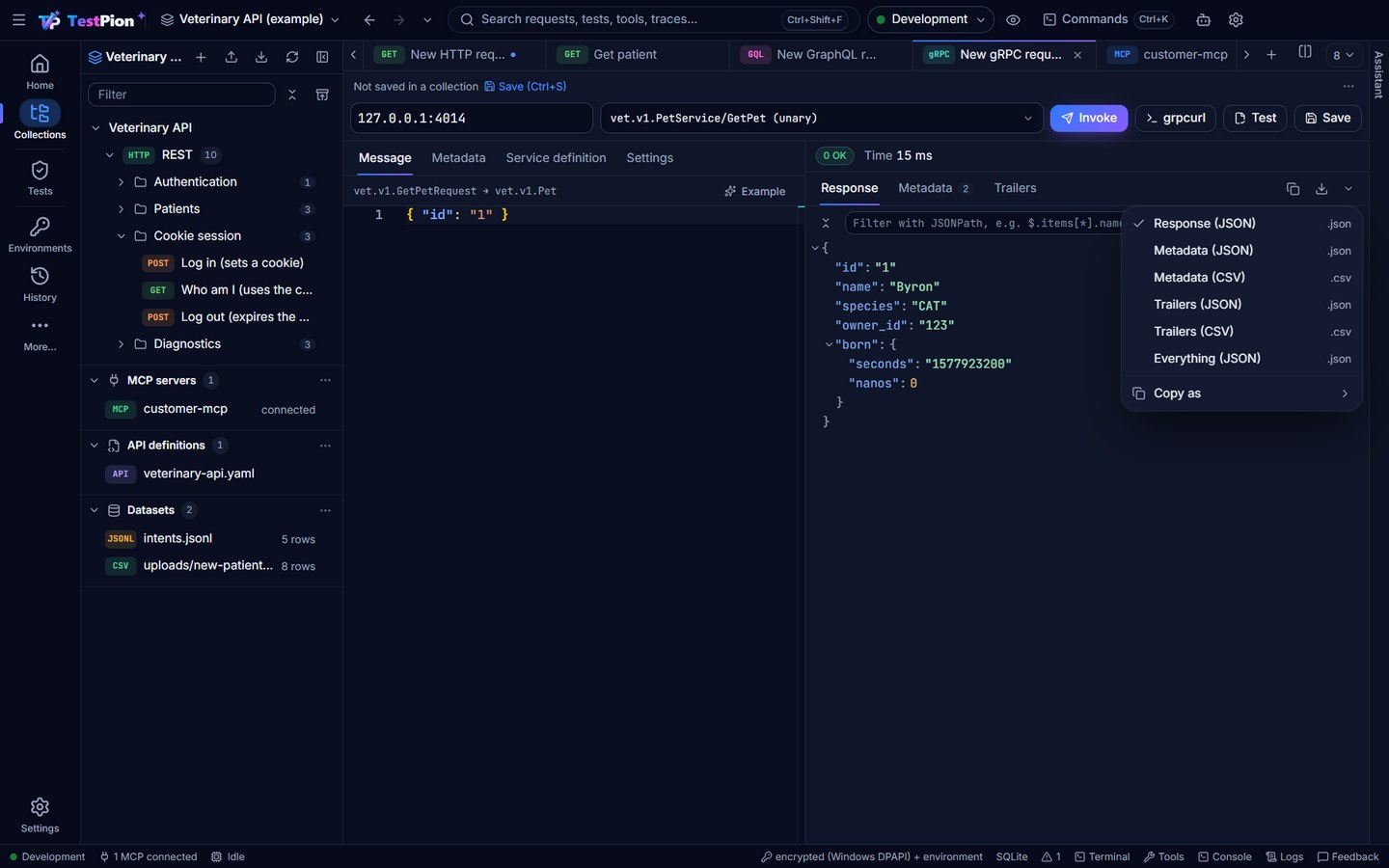
Messages
Messages use the JSON form of the proto fields, keeping their original names (owner_id):
- 64-bit integers are strings (
"id": "42"), so large values stay exact. - Enums are their names (
"species": "CAT"). google.protobuf.Timestampis{ "seconds": "…", "nanos": 0 }.- Fields that aren't set come back with their default values.
Every value supports {{variables}} from the active environment, including the address and metadata. Keep tokens in secret variables.
Settings
- Use TLS: on for
grpcs://addresses; turn it on for a TLS server given ashost:port. - Deadline: how long the call may take (default 30 s). A call that runs out returns
DEADLINE_EXCEEDED. - Certificates: a CA certificate for servers with a private CA, and a client certificate and private key for mutual TLS (PEM text, Load… a file, or a
{{variable}}). The private key is never saved with the draft: keep it in a secret environment variable and enter{{clientKey}}, or paste it for the current session. IP addresses work with TLS too; the certificate is checked against the IP.
Try it
The demo servers include a gRPC service:
node examples/servers/demo-servers.mjsConnect to 127.0.0.1:4014 with examples/veterinary-workspace/protos/vet/v1/pets.proto (name it vet/v1/pets.proto). Try GetPet with {"id": "1"} (or "9" for NOT_FOUND), StreamVitals for a live stream, and CheckIn with a list of pets.
Tests, CLI and AI agents
gRPC calls can be tests in a workspace's tests/ folder, run by the test runner and in CI:
name: Get a pet
type: grpc
target: "{{grpcHost}}"             # host:port, or grpcs://host:port
method: vet.v1.PetService/GetPet
message: { id: "1" }
protos: [protos/vet/v1/pets.proto] # workspace paths, with the files they import
assertions:
  - type: grpc-status              # OK by default; a name, a code or a list
    expected: OK
  - type: equals
    path: $.name
    expected: Byron
Leave protos empty (protos: []) to describe the service through server reflection. JSONPath assertions run on the response message, or on the list of messages for streaming methods ($[0].name). Without a grpc-status assertion, a test passes only with status OK.
- From a terminal:
testpion grpclists the methods of.protofiles or calls one. - AI agents using
testpion mcp-serverget thegrpc_calltool.